Activity Registration Wizard
Feature Detail
Description
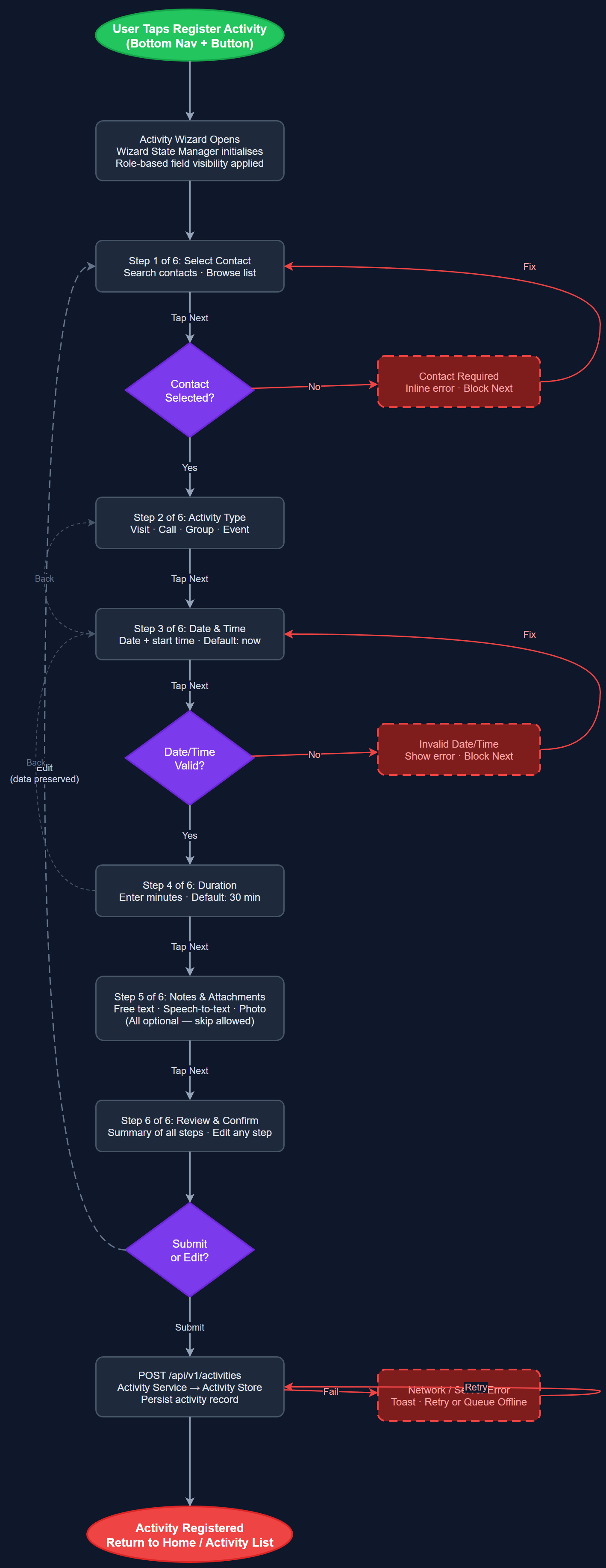
This feature provides a structured multi-step wizard for registering activities that require more detail than the quick-log widget supports. The wizard guides the user through a linear flow: contact selection → activity type → date and time → duration → optional notes and attachments → review and submit. Each step is a full screen with clear progress indication, back navigation, and inline validation. The wizard is the primary registration path for first-time users and for complex activities such as group events, home visits with structured report fields, or activities requiring expense linkage.
User Flow
Analysis
Not all activities fit the quick-log pattern. Home visits (Blindeforbundet), group activities with multiple attendees (NHF), and activities requiring structured report fields all demand a guided registration experience that ensures completeness and accuracy. The wizard format reduces input errors by breaking a complex form into digestible steps, each with focused context and validation. This directly improves the quality of data available for Bufdir reporting and organizational analytics. A well-designed wizard also serves as an onboarding mechanism, teaching new peer mentors the vocabulary and structure of activity reporting through the act of completing their first registration.
Built in Flutter as a multi-screen wizard using a shared WizardStateManager BLoC that holds form state across steps and handles navigation. Each step is a separate widget pushed onto a nested navigator, enabling independent back-navigation without losing progress. Step order is configurable per organization via the organization labels/settings system to support custom terminology and required fields. The wizard reuses the same REST API endpoint (POST /api/v1/activities) as quick-log, with a richer payload. Validation is performed per-step on 'Next' tap, with error messages displayed inline. The final review screen renders a summary of all entered data before submission. Accessibility: back navigation via button (not swipe), vertical scroll within each step, focus management on step transition.
Components (114)
Shared Components
These components are reused across multiple features
User Interface (12)
Service Layer (34)
Data Layer (22)
Infrastructure (38)
User Stories
No user stories have been generated for this feature yet.