Advantage Calculator
Feature Detail
Description
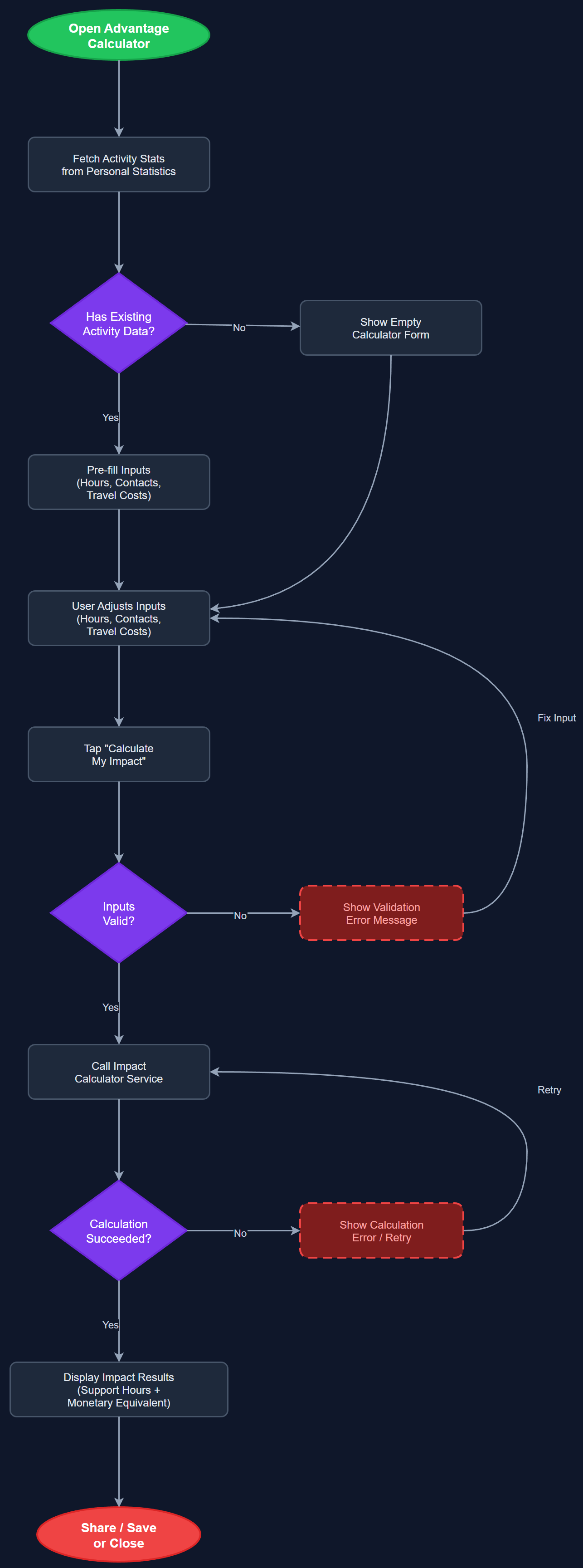
The Advantage Calculator is an interactive tool within the mobile app that helps peer mentors and coordinators quantify the social and economic value of their volunteering work. By inputting their activity hours, number of contacts supported, and travel costs, users receive an estimated impact figure — expressed both in hours of support delivered and in monetary equivalents (e.g., what equivalent professional support would cost). This makes the abstract value of peer mentorship concrete and communicable, both for personal motivation and for organizational reporting to funders like Bufdir.
User Flow
Analysis
Funders, board members, and decision-makers increasingly require evidence-based impact reporting. The Advantage Calculator provides a ready-made narrative for coordinators and org admins when communicating with Bufdir, local governments, or media. For individual peer mentors, seeing their contribution translated into tangible figures (e.g., '120 hours = NOK 48,000 in equivalent professional support') creates a powerful sense of purpose and validates their time investment. For Norse Digital Products, this feature strengthens the commercial proposition of Meander by enabling sales conversations around measurable ROI — directly feeding into the Product Sales Website's benefit calculator and demo booking conversion funnel.
The calculator logic should be implemented as a pure Flutter stateful widget with no backend dependency for basic calculations, enabling offline use. Impact multipliers (hourly rates, cost equivalents) are configurable per organization and stored in the organization_settings table, allowing orgs to align figures with their own reporting frameworks. The calculation engine should expose a shared service layer reusable by the Product Sales Website's cost comparison tool (separate codebase, but same formula logic documented in shared API spec). Output should be exportable as a summary card (PNG or PDF) for use in presentations. Ensure all numeric inputs are accessible via keyboard and screen reader with appropriate ARIA labels.
Components (114)
Shared Components
These components are reused across multiple features
User Interface (12)
Service Layer (34)
Data Layer (22)
Infrastructure (38)
User Stories
No user stories have been generated for this feature yet.