Authentication Methods (Passkeys)
Feature Detail
Description
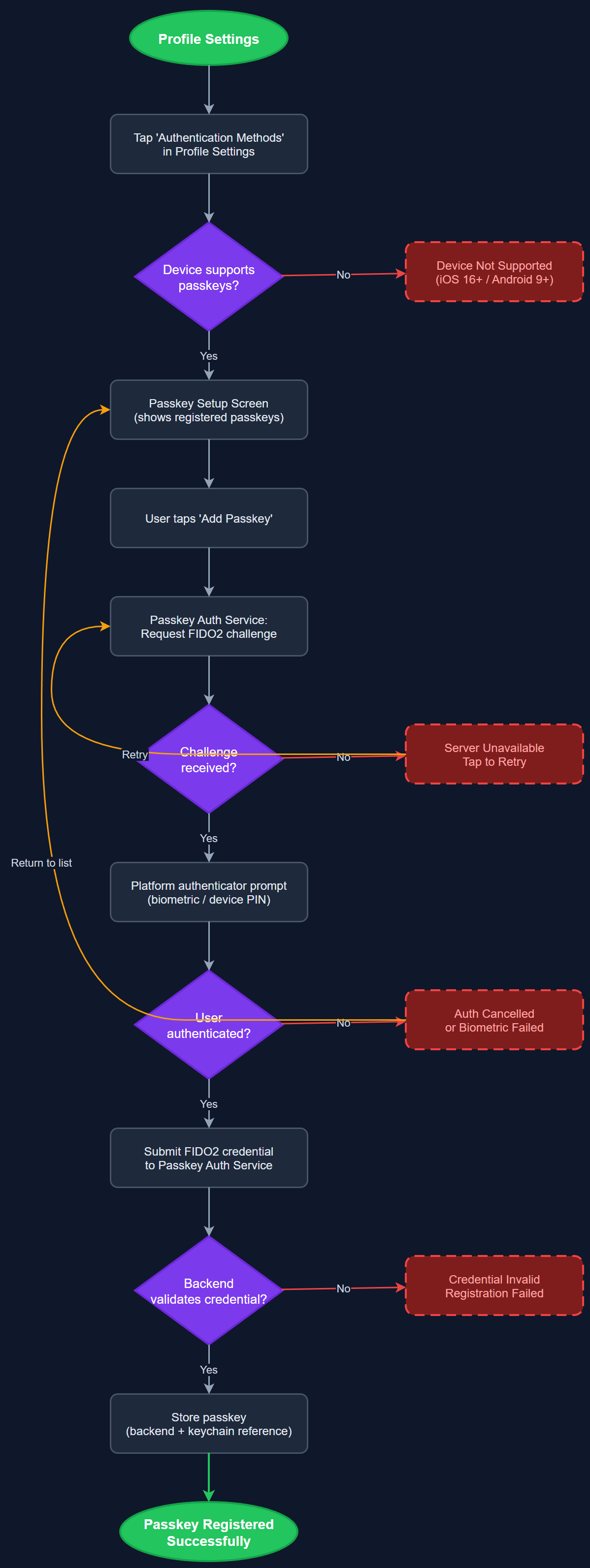
This feature enables users to register and use FIDO2 passkeys as an authentication method, providing a phishing-resistant, passwordless login experience backed by device biometrics or hardware security keys. The Passkey Setup Screen guides users through the passkey registration flow using the platform authenticator APIs on iOS (Sign in with Apple passkeys) and Android (Credential Manager). Once registered, passkeys can be used as the primary or supplementary authentication method on subsequent logins without requiring a password entry.
User Flow
Analysis
Passkeys represent the modern standard for secure, user-friendly authentication and directly address the platform's accessibility and usability requirements. For peer mentors with motor impairments or cognitive challenges — a core constituency across NHF, Blindeforbundet, and HLF — eliminating the password entry step reduces login friction substantially. From a security perspective, passkeys are immune to phishing and credential stuffing attacks, reducing the risk of unauthorized access to sensitive peer mentor and contact data. Adopting passkeys positions Meander as a security-forward platform aligned with current FIDO Alliance and W3C WebAuthn standards, which is increasingly expected by enterprise and public-sector customers.
The Passkey Auth Service integrates with the Flutter local_auth and credential_manager packages to interact with the platform's FIDO2 authenticator APIs. The backend REST API must implement WebAuthn registration and authentication ceremonies, storing public key credentials per user in the database. The setup flow uses a guided wizard pattern on the Passkey Setup Screen with clear explanations of what a passkey is, minimizing cognitive load for less technical users. Error handling must cover scenarios where the device does not support passkeys, falling back gracefully to existing authentication methods. WCAG 2.2 AA compliance applies throughout: all prompts, dialogs, and confirmations must be screen-reader accessible and support keyboard navigation on devices where applicable.
Components (114)
Shared Components
These components are reused across multiple features
User Interface (12)
Service Layer (34)
Data Layer (22)
Infrastructure (38)
User Stories
No user stories have been generated for this feature yet.