Auto-Approval Rules
Feature Detail
Description
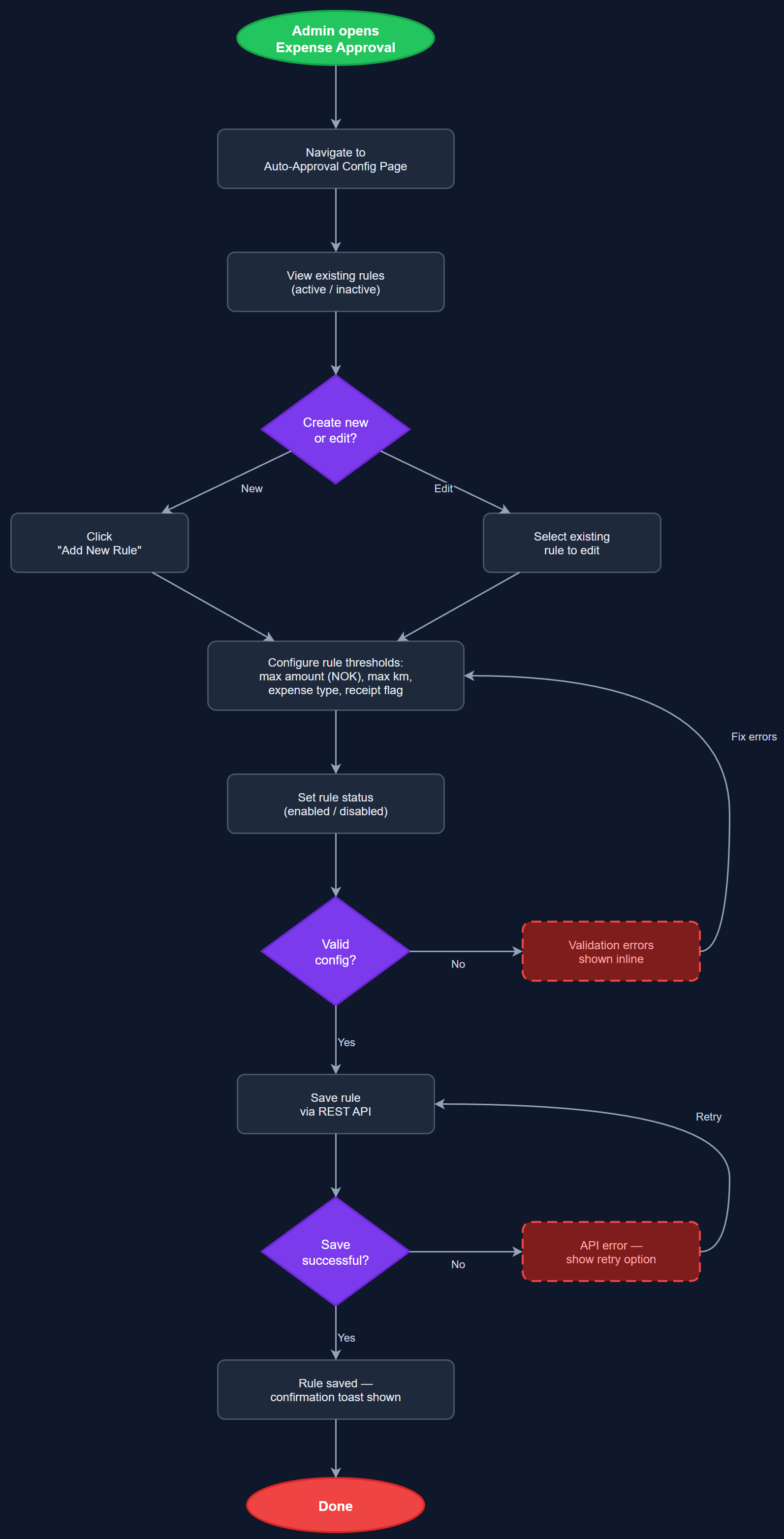
Auto-Approval Rules allow organization administrators to configure threshold-based policies that automatically approve expense claims without requiring manual coordinator review. Administrators define rules based on parameters such as total amount, distance (kilometres), expense type, and the absence of receipt attachments. Claims that fall within all configured rule thresholds are approved instantly upon submission, while claims that exceed any threshold are routed to the manual approval queue. This mirrors the HLF requirement for automatic approval of claims under 50 km or without out-of-pocket expenses.
User Flow
Analysis
A large share of expense submissions — particularly low-value travel claims — are routine and straightforward, yet they consume significant coordinator time when processed manually. HLF reported that 60–70% of peer mentor registrations have no reimbursement component, meaning coordinators spend effort on approvals that add no real oversight value. Automating the approval of low-risk claims dramatically reduces administrative overhead, accelerates reimbursement for peer mentors, and allows coordinators to focus their attention on complex or high-value submissions that genuinely require review. Auto-approval rules also reduce the risk of backlog buildup during busy periods, which directly impacts volunteer satisfaction and the organization's ability to maintain reporting accuracy.
Auto-approval rules are stored in a dedicated `auto_approval_rules` table per organization, with columns for `expense_type_id` (nullable for global rules), `max_amount`, `max_distance_km`, `requires_receipt`, and `enabled`. When an expense is submitted via the REST API, the save handler queries applicable rules for the organization and evaluates the claim synchronously before persisting to `expense_approvals`. Matching rules set status to `approved` immediately; non-matching claims are set to `pending`. Rule configuration is exposed as a Next.js admin page where Org Admins manage rules using a form-based UI. Feature flag `auto_approval_rules` gates the functionality per organization. All auto-approval decisions are written to `audit_logs` with a `source: 'auto'` field to distinguish from manual approvals for compliance auditing.
Components (113)
Shared Components
These components are reused across multiple features
User Interface (12)
Service Layer (34)
Data Layer (22)
Infrastructure (38)
User Stories
No user stories have been generated for this feature yet.