Background Sync
Feature Detail
Description
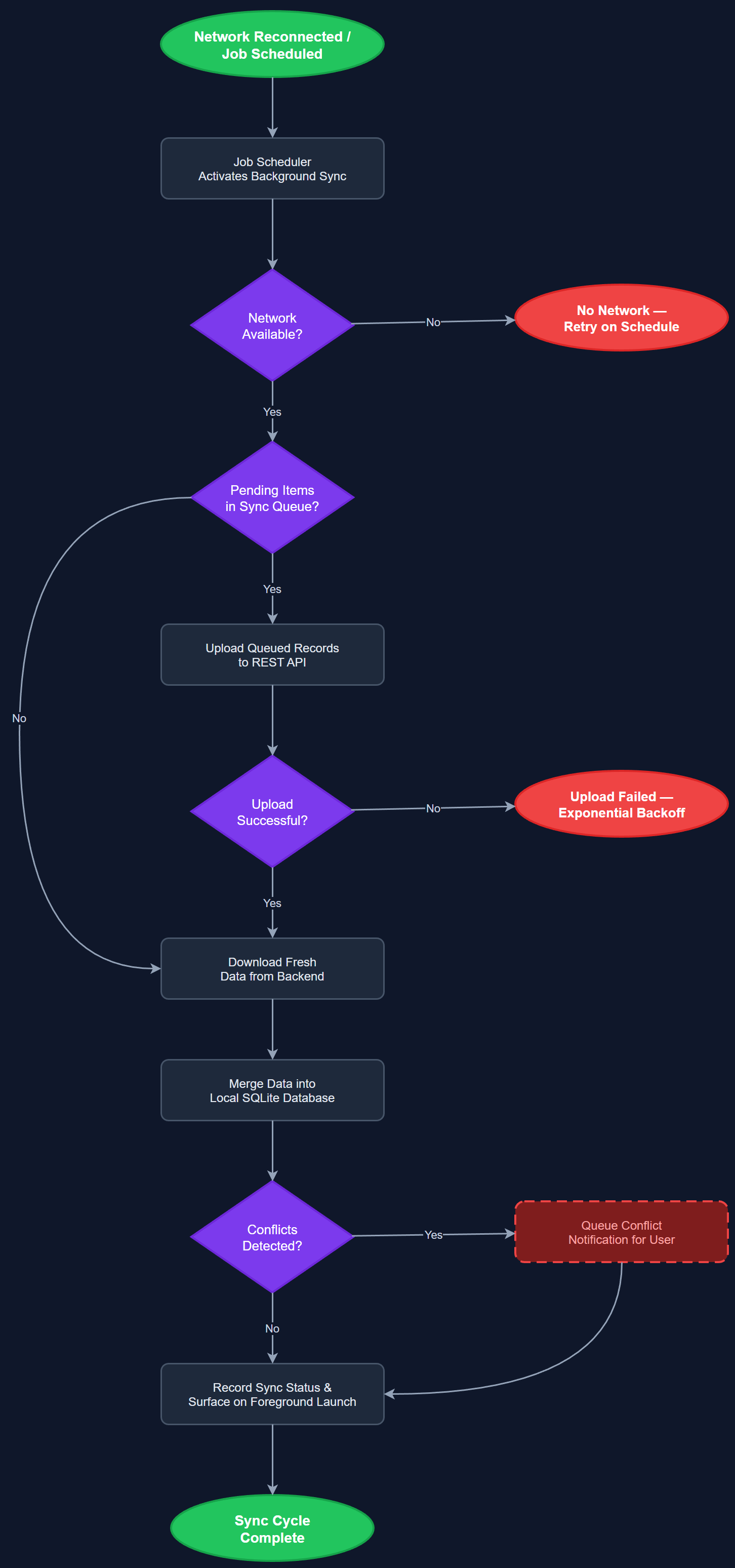
Background Sync ensures that queued offline mutations and data refreshes are processed automatically when the device regains connectivity, without requiring the user to open the app. The feature leverages platform-specific background execution APIs to schedule periodic sync jobs that upload pending changes and download fresh data from the backend. A job scheduler manages retry logic, exponential backoff, and failure reporting, ensuring robust delivery of queued records even under intermittent network conditions. Sync status and any conflicts are surfaced to the user through non-intrusive in-app notifications upon next foreground launch.
User Flow
Analysis
Without background sync, users returning to connectivity would need to manually trigger a sync, adding friction and creating a risk that they forget to do so — leaving the backend out of date and causing coordinators and org admins to see stale data. Automatic background processing removes this responsibility from the user entirely, making the offline experience seamless and invisible. For organizations like HLF that track 380+ individual registrations per year per peer mentor, even small sync friction can compound into significant data quality problems. Background sync also ensures that new assignments, notifications, and contact updates are available immediately when the user opens the app, improving responsiveness and trust in the platform.
On iOS, the implementation uses WorkManager via the flutter_workmanager plugin, which wraps BGTaskScheduler for background fetch and processing tasks within Apple's constraints. On Android, WorkManager provides reliable deferred execution with battery-optimized scheduling. The Job Scheduler component registers tasks at login and reschedules them after each successful sync run. The sync job reads the offline mutation queue from the local SQLite database, batches mutations by entity type, calls the REST API, and marks records as synced or failed. Exponential backoff (initial 30s, max 1h) is applied to failed records. Sync progress and any unresolvable conflicts are written to a status table read by the foreground app on next launch, which then displays appropriate user-facing messages via the notification system.
Components (113)
Shared Components
These components are reused across multiple features
User Interface (12)
Service Layer (34)
Data Layer (22)
Infrastructure (38)
User Stories
No user stories have been generated for this feature yet.