Bulk Actions
Feature Detail
Description
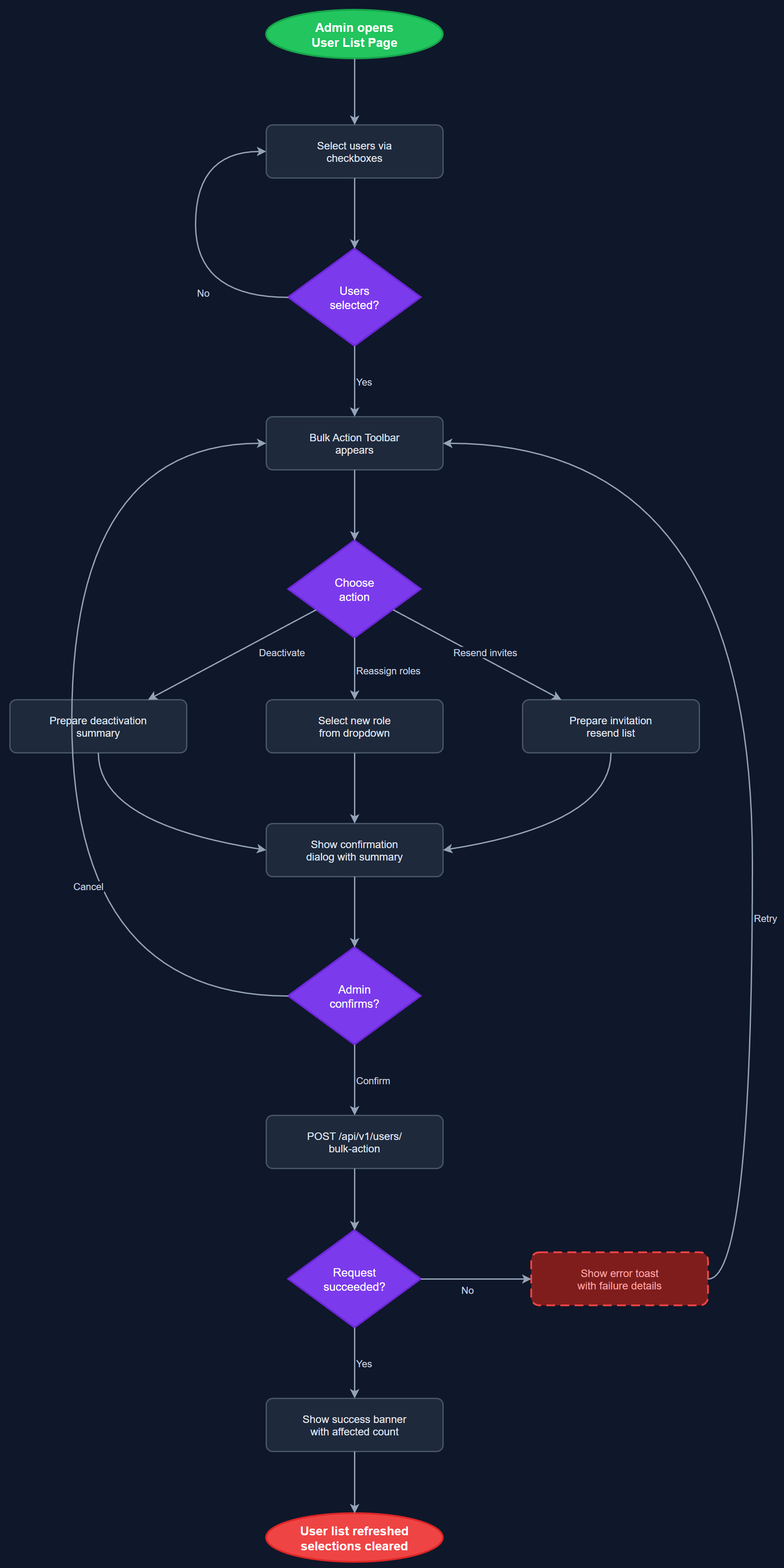
This feature allows administrators to perform actions on multiple users simultaneously rather than one at a time. Supported bulk operations include deactivating a selection of users, reassigning roles across a group, and re-sending invitation emails to pending users who have not yet completed onboarding. The feature provides a checkbox-based selection interface on the user list page, a contextual action toolbar that appears when one or more users are selected, and a confirmation dialog that summarizes the intended changes before execution. Each operation is processed atomically to avoid partial failures.
User Flow
Analysis
Organizations managing large cohorts of peer mentors face high volunteer turnover, particularly at the start and end of program cycles. Processing deactivations or role changes one user at a time is a significant time sink for Org Admins and Coordinators. Bulk actions compress multi-hour administrative tasks into minutes, directly reducing operational costs and freeing staff to focus on mission-critical work. The feature also improves data hygiene by making it practical to clean up stale accounts promptly, which has downstream benefits for Bufdir reporting accuracy and access security. For NHF with 1,400 local associations, this capability is especially important during annual role refresh cycles.
The Bulk Action Toolbar component renders conditionally in the user list page when the selection state is non-empty, implemented using React state in a client component island within the Next.js page. Bulk operations are dispatched as PATCH requests to /api/v1/users/bulk with a body containing an array of user IDs and the target action. The Bulk User Processing Service validates each user ID against the requester's organization scope before executing, ensuring no cross-tenant mutations. Database operations run within a single PostgreSQL transaction to guarantee atomicity. Progress feedback is shown inline for large batches. All bulk operations generate individual audit log entries per affected user so the audit trail remains granular.
Components (111)
Shared Components
These components are reused across multiple features
User Interface (12)
Service Layer (34)
Data Layer (22)
Infrastructure (38)
User Stories
No user stories have been generated for this feature yet.