Custom Reports
Feature Detail
Description
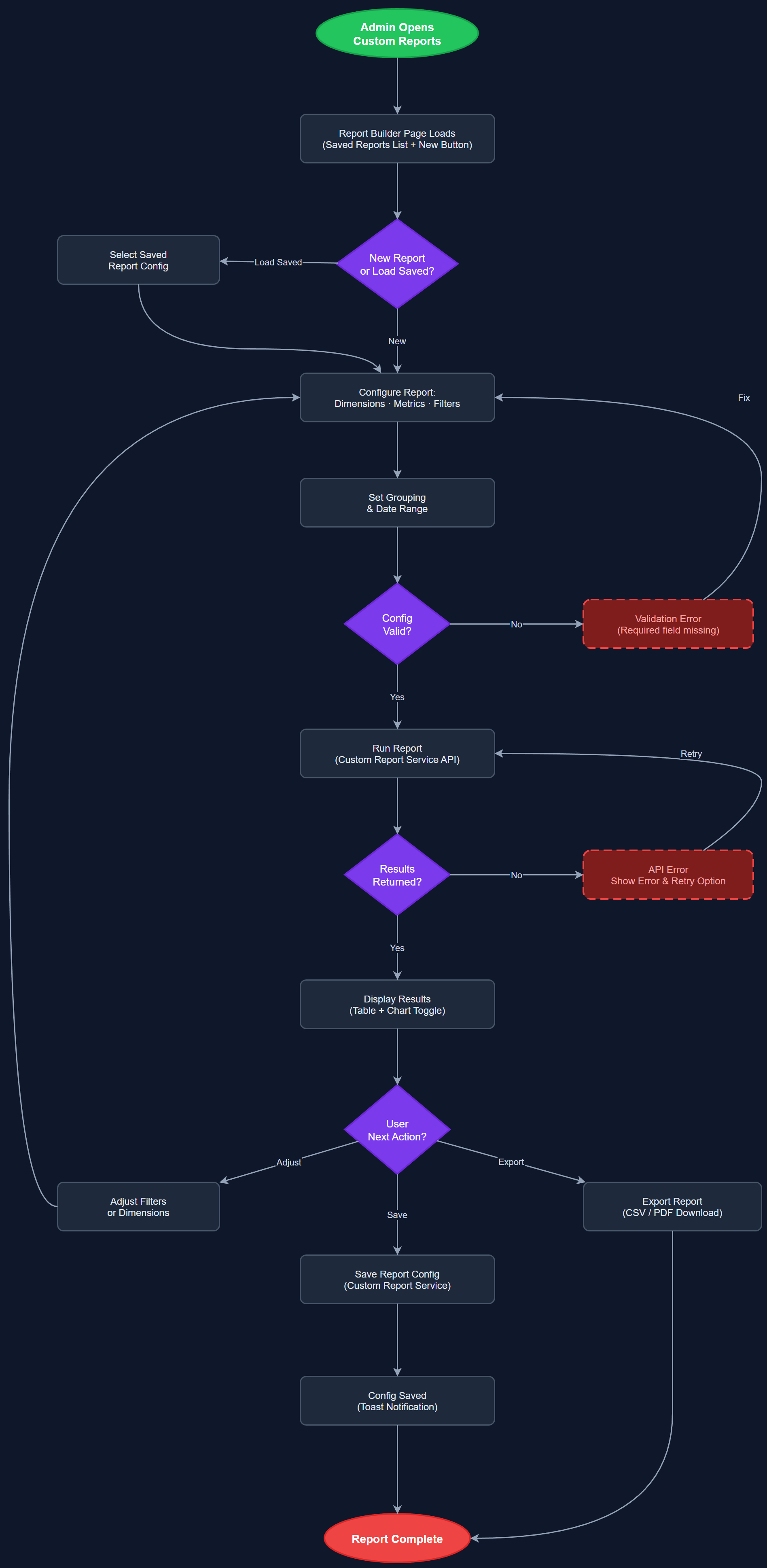
Custom Reports gives organization administrators and coordinators the ability to build ad-hoc reports by selecting dimensions, metrics, and filters beyond the fixed templates available in the Team Reports feature. Users can choose which data fields to include (activity type, peer mentor, contact, date, duration, expense status, etc.), apply multiple simultaneous filters, group results by different dimensions, and save report configurations for reuse. The feature serves advanced reporting needs that vary between organizations and cannot be anticipated with fixed templates, enabling each organization to extract the specific insights relevant to their operational model.
User Flow
Analysis
Different organizations track success differently. NHF measures activity distribution across 12 national associations and 1,400 local branches; HLF focuses on reimbursement compliance and certification status; Blindeforbundet tracks assignment thresholds and response times. No single fixed report template can serve all these needs simultaneously. Custom Reports removes the ceiling on analytical capability, allowing each organization to answer their own operational questions without requiring platform changes or support requests. For coordinators managing large peer mentor networks, the ability to slice data by multiple dimensions simultaneously — for example, activities by type AND association AND month — surfaces insights that aggregate views hide. This feature also strengthens the platform's commercial proposition, as organizations evaluating Meander against alternatives will compare reporting flexibility as a key criterion.
The report builder UI is implemented as a drag-and-drop or checkbox-based field selector built in React on the Next.js admin portal. The backend exposes a flexible query API that accepts a declarative report specification (selected fields, filter conditions, grouping keys, sort order) and executes a dynamically constructed SQL query against PostgreSQL. Query construction is handled by a server-side query builder class that validates the specification against an allowed-fields whitelist before generating SQL, preventing injection and ensuring tenant isolation. Saved report configurations are persisted in a report_configs table linked to organization_id and user_id. Exports to CSV and XLSX are supported for all custom reports. Query complexity limits (max joins, max result rows) are enforced to protect database performance. Role access: Org Admin can create and share report configs organization-wide; coordinators can create personal configs and view shared ones.
Components (123)
Shared Components
These components are reused across multiple features
User Interface (12)
Service Layer (34)
Data Layer (22)
Infrastructure (38)
User Stories
No user stories have been generated for this feature yet.