Custom Terminology
Feature Detail
Description
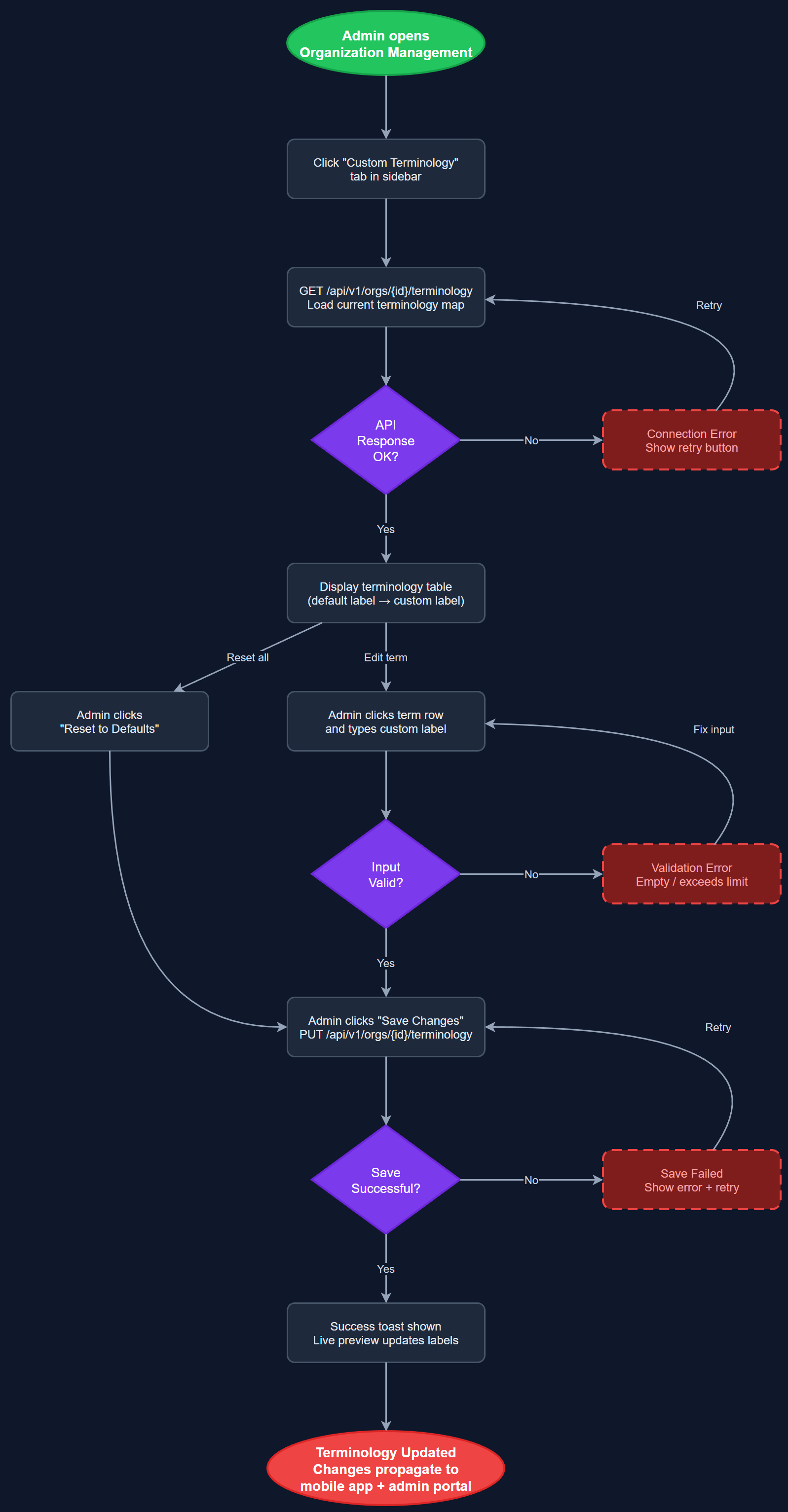
Custom Terminology allows each organization to replace the platform's default labels and terminology with their own preferred language and naming conventions. For example, one organization may call their volunteers 'Likepersoner' while another uses 'Støttepersoner', and coordinators may be called 'Fagpersoner' in a specific context. Administrators configure a terminology map in the admin portal, and these labels are dynamically injected throughout both the admin portal and the mobile app for all users belonging to that organization. This ensures that the platform feels native to each organization's internal culture and avoids confusing staff who are used to their own vocabulary. The system supports overrides for all major entity labels including roles, activity types, and navigation items.
User Flow
Analysis
Non-profit organizations in Norway have deeply ingrained internal terminology that varies significantly across the sector. Forcing all organizations to adopt a generic vocabulary would create resistance to adoption, increase training costs, and make the platform feel foreign to day-to-day users. Custom terminology removes this friction by allowing the platform to speak each organization's language, dramatically improving user acceptance and reducing onboarding time. From a sales perspective, this feature is a strong differentiator: prospective buyers can immediately see that the platform adapts to their organization rather than forcing them to adapt to it. It also reduces support overhead because staff will not be confused by unfamiliar labels in the interface. The feature is particularly valuable for HLF and Blindeforbundet, which have specific internal naming conventions established over decades.
Terminology is stored as a JSONB column in the organization_settings table, mapping platform keys to organization-specific strings. The API returns the active terminology map as part of the session bootstrap payload so the client has all labels available at startup without additional round trips. On the admin portal (Next.js), labels are resolved server-side via a terminology context provider injected into the layout. On the mobile app (Flutter), the terminology map is stored in a Riverpod provider loaded at login and persisted locally using Hive for offline access. The terminology config page renders a form with grouped label categories (roles, entities, actions, navigation) using the current org values as defaults. A reset-to-defaults button restores platform vocabulary. All label keys are defined in a central constants file to prevent drift between products.
Components (111)
Shared Components
These components are reused across multiple features
User Interface (12)
Service Layer (34)
Data Layer (22)
Infrastructure (38)
User Stories
No user stories have been generated for this feature yet.