Expense Approval Queue
Feature Detail
Description
The Expense Approval Queue provides organization administrators and coordinators with a centralized interface in the Admin Web Portal for reviewing, approving, or rejecting expense claims submitted by peer mentors. The queue aggregates all pending expense submissions across the organization, displaying relevant details such as expense type, amount, receipt attachments, and the submitting peer mentor. Coordinators can process individual claims or apply batch decisions to groups of similar expenses, with full audit trail logging for every approval action taken.
User Flow
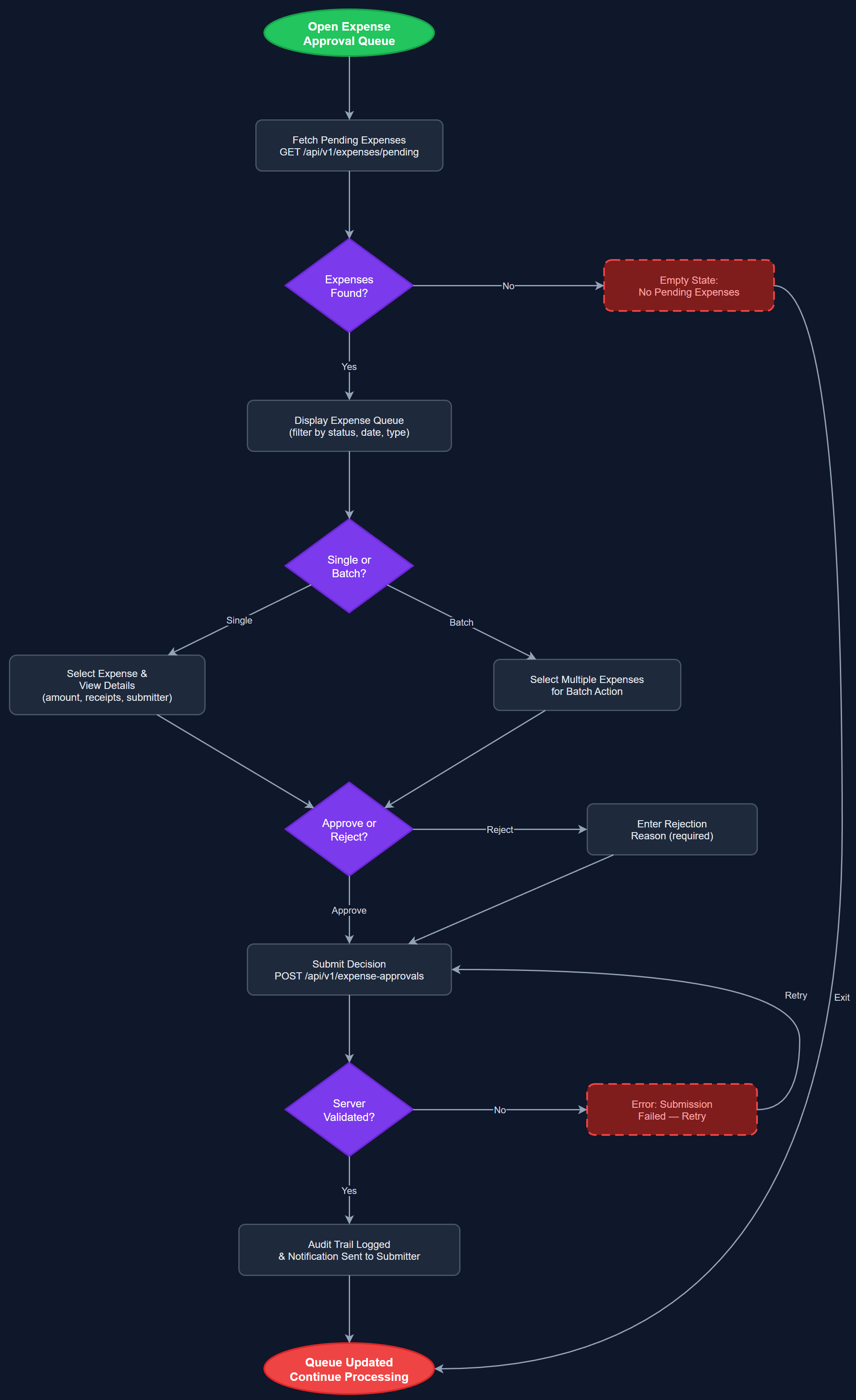
Analysis
Manual expense approval via email chains and spreadsheets is a significant administrative burden for coordinators and organization administrators, frequently causing delays in reimbursement that erode volunteer satisfaction and retention. A structured approval queue eliminates ambiguity about which claims are pending, reduces duplicate processing, and ensures every submission is reviewed within a predictable timeframe. For organizations receiving Bufdir funding, a complete and auditable approval workflow is essential for demonstrating proper governance of public funds. By centralizing claims in a single interface with contextual information — including receipt images and expense type rules — coordinators can make faster, better-informed decisions while reducing the risk of approving ineligible or duplicate claims.
The queue is implemented as a Next.js server-side rendered page within the Admin Web Portal, querying the PostgreSQL `expense_approvals` and `expenses` tables with joins to `users`, `activities`, and `expense_receipts`. The page uses server components for initial data load and client components for interactive approval actions, submitting PATCH requests to the REST API (`/api/v1/expenses/:id/approve` and `/api/v1/expenses/:id/reject`). Each approval action writes an entry to `audit_logs` for compliance. Receipt images are fetched from the storage layer and rendered inline. Pagination and filtering (by status, date range, expense type, submitting user) are implemented server-side to handle organizations with high submission volumes. Role-based access control ensures only Coordinators and Org Admins can access the queue.
Components (113)
Shared Components
These components are reused across multiple features
User Interface (12)
Service Layer (34)
Data Layer (22)
Infrastructure (38)
User Stories
No user stories have been generated for this feature yet.