External Resource Links
Feature Detail
Description
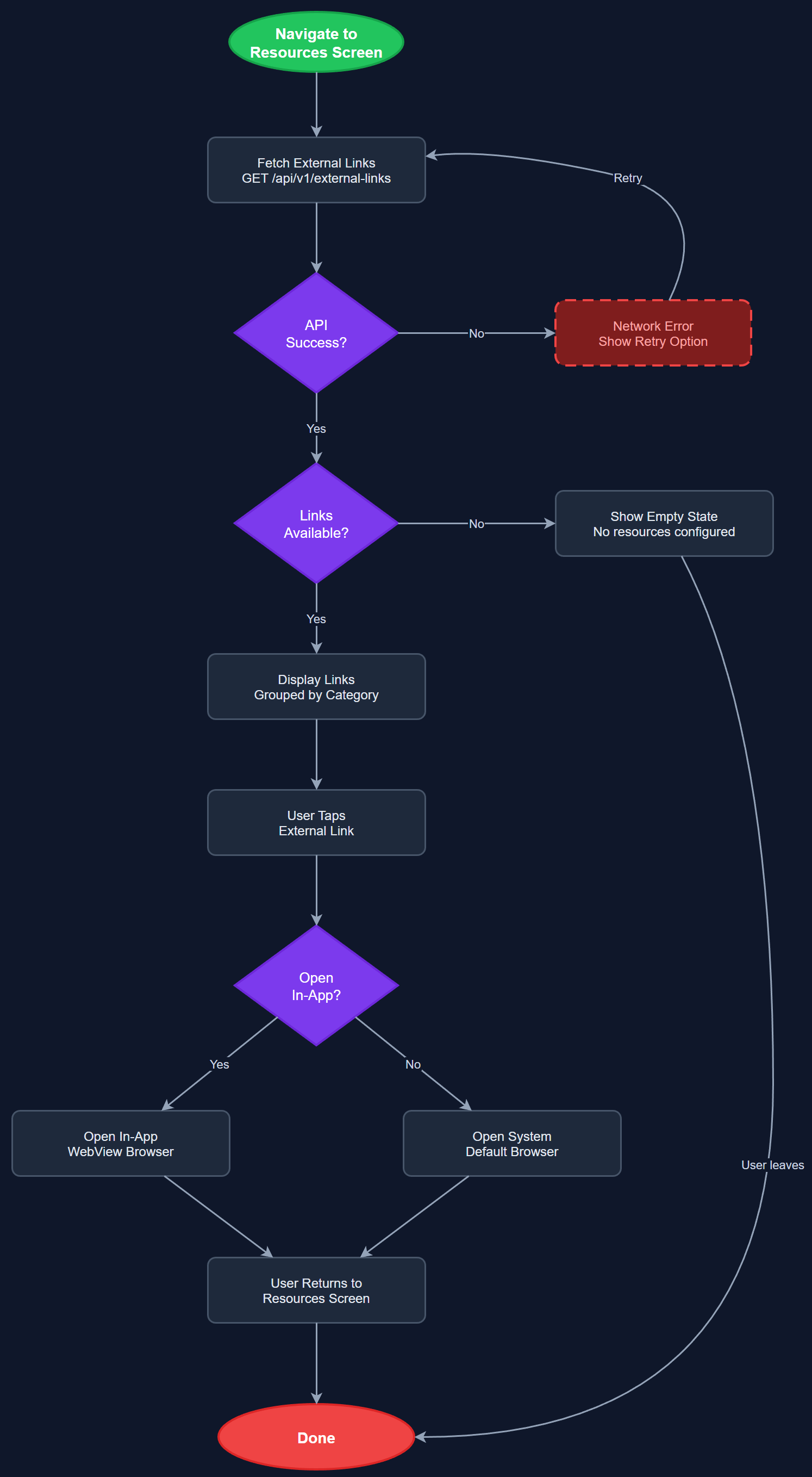
External Resource Links provides a curated, organization-configurable screen of external URLs and resources relevant to peer mentors and coordinators, such as training materials, government guidance documents, organization websites, and tool links. Content is managed by organization admins via the Admin Portal and delivered to the mobile app via the REST API. Links open in an in-app browser or the system browser depending on configuration. The screen supports grouping of links by category and displays a short description alongside each link to help users understand what they are accessing.
User Flow
Analysis
Peer mentors and coordinators regularly need access to external resources — Bufdir guidelines, organization handbooks, training portals, and support materials — and currently rely on email threads or word of mouth to find these. Centralizing these links inside the app reduces context-switching, ensures users always access the current and correct version of resources, and allows organizations to push urgent reference materials without an app update. For organizations like NHF and HLF that manage large volunteer networks with varying digital literacy, having trusted links curated and visible inside their primary tool reduces the risk of users accessing outdated or unofficial information. This feature also supports onboarding, giving new peer mentors immediate access to getting-started resources.
The screen fetches link content from the REST API endpoint scoped to the user's organization, with response cached locally for offline access. Content is modeled as a simple list of link objects (title, URL, description, category, icon) stored in the Links Store (SQLite). The Flutter UI renders a grouped list using ListView.builder with category headers. URL launching uses the flutter_url_launcher package with fallback handling for unsupported URL schemes. In-app browser is implemented via flutter_inappwebview for links flagged as internal; external links open the system browser. All links must have descriptive text for screen readers — bare URLs are not permitted as link labels. Organization admins manage the link catalog through the Admin Portal's organization settings section, with changes propagating to the mobile app on next sync.
Components (112)
Shared Components
These components are reused across multiple features
User Interface (12)
Service Layer (34)
Data Layer (22)
Infrastructure (38)
User Stories
No user stories have been generated for this feature yet.