Feature Toggles
Feature Detail
Description
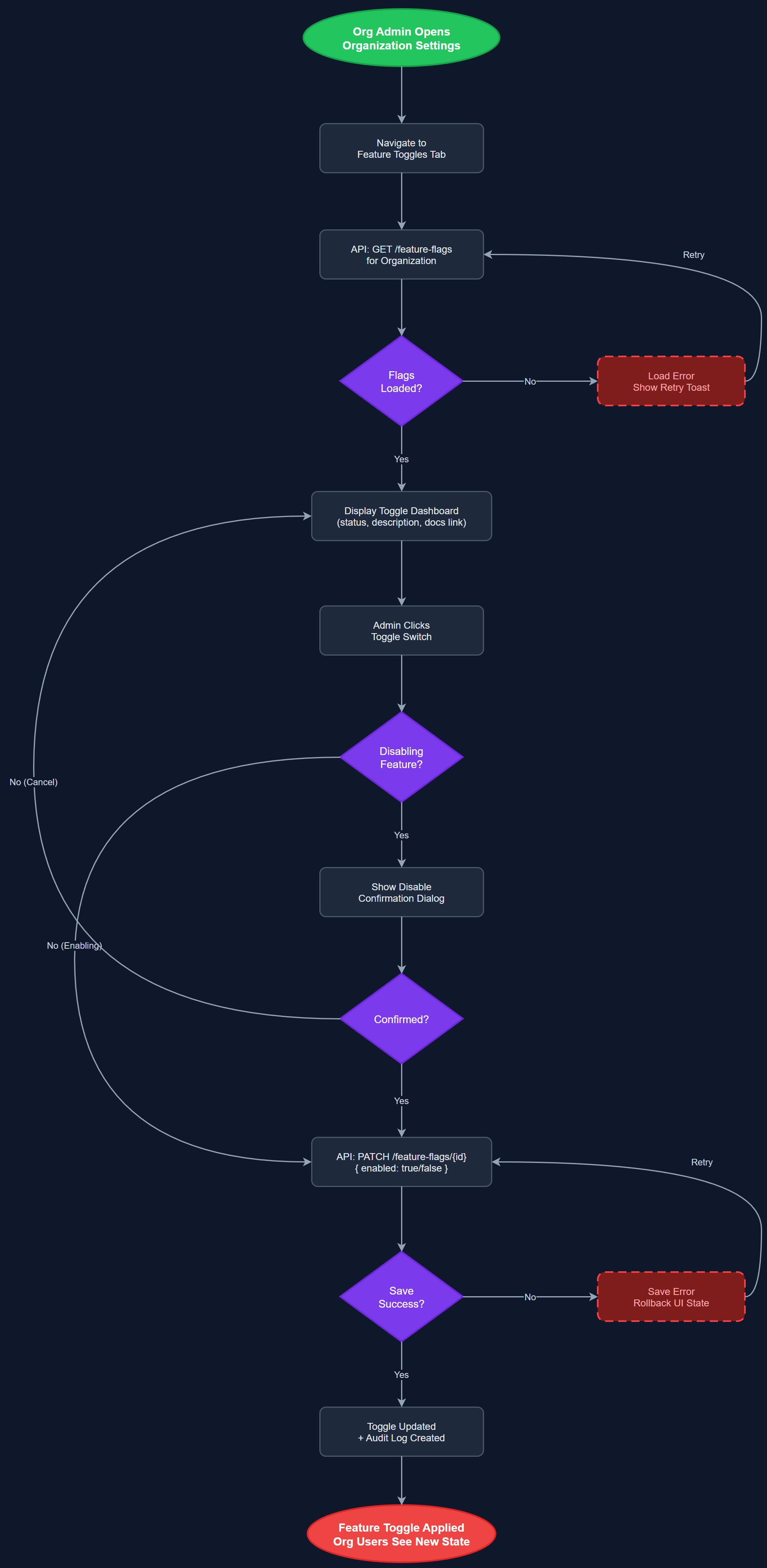
Feature Toggles gives Organization Administrators the ability to enable or disable specific platform capabilities for their organization independently of the global release schedule. Each feature toggle corresponds to a distinct product capability such as speech-to-text input, gamification, encrypted assignments, or expense reimbursement. Disabling a toggle hides the corresponding UI elements and disables the related API endpoints for that organization's users. This allows Norse Digital Products to ship features to production for early-adopter organizations while keeping them hidden from others until they are ready, and allows organizations to opt out of features that are not relevant to their context or that conflict with their internal processes. The toggle dashboard shows each feature's status, a description, and a link to documentation.
User Flow
Analysis
Feature toggles serve a dual purpose: they give Norse Digital Products the operational control needed to roll out new capabilities gradually with minimal risk, and they give organizations the autonomy to shape their own product experience. Organizations like HLF, which is coordinating a parallel portal project, may need to defer certain features to avoid overlap. Others may want to enable experimental features ahead of general availability to gain a competitive advantage in volunteer engagement. This flexibility significantly reduces the coordination overhead of multi-organization deployments and supports the inkrementell utrulling principle identified across all workshop organizations. From a product operations perspective, feature toggles also provide a safe mechanism for incident response — a misbehaving feature can be disabled for affected organizations without a code deployment.
Feature flags are stored in the feature_flags table with columns for organization_id, feature_key, enabled boolean, and metadata. The API middleware reads the feature flag state from a Redis cache (TTL 60 seconds) backed by PostgreSQL, so toggles propagate quickly without database load on every request. The admin portal renders a toggle list page using a data table with switch controls and inline descriptions fetched from a static feature registry file. The registry defines all known feature keys, default states, and human-readable descriptions. On the mobile app, the feature map is included in the session bootstrap payload alongside terminology, so no extra requests are needed. Flutter widgets consume the feature map via a Riverpod provider and conditionally render or hide UI elements. API endpoints enforce feature access server-side regardless of client state to prevent bypass.
Components (112)
Shared Components
These components are reused across multiple features
User Interface (12)
Service Layer (34)
Data Layer (22)
Infrastructure (38)
User Stories
No user stories have been generated for this feature yet.