Member Associations
Feature Detail
Description
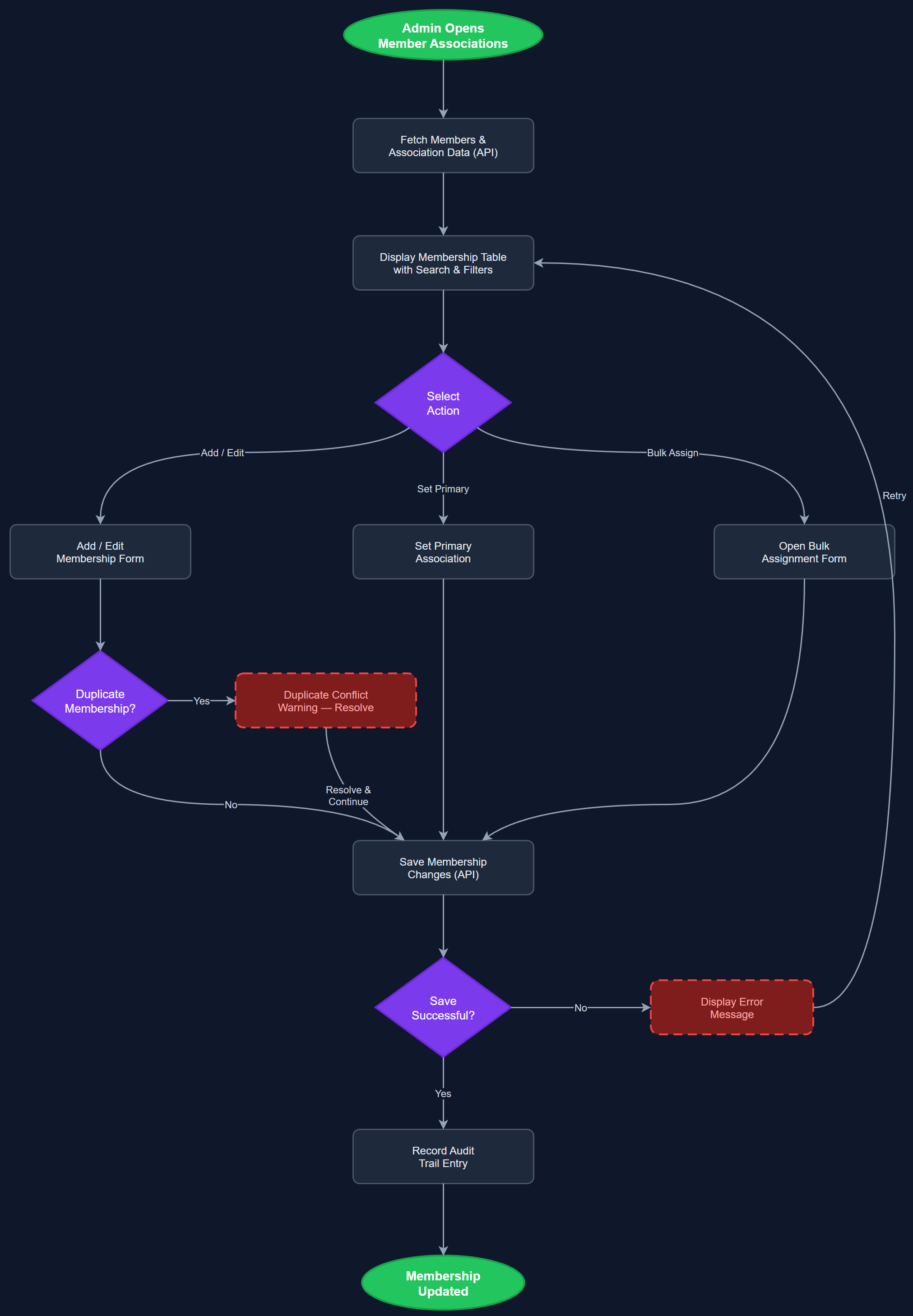
Member Associations manages the relationships between users and the local associations they belong to within the organizational hierarchy. A single user — particularly a peer mentor — may be a member of multiple local associations simultaneously, which is especially common in NHF where members can belong to up to five local associations at once. This feature provides administrators with a dedicated page to view, add, and remove association memberships for individual users, define the primary association for reporting purposes, and detect and resolve potential duplicate reporting scenarios. The interface also supports bulk assignment of users to associations and displays a clear audit trail of membership changes. Association context is used throughout the platform to scope activity reports, statistics, and coordinator oversight correctly.
User Flow
Analysis
Incorrect or missing association membership data is a primary cause of reporting errors and double-counting in the current manual workflows described by NHF. When a peer mentor registers activities without a clear association context, the coordinator cannot correctly attribute those activities to the right local association for Bufdir reporting, leading to inaccurate grant reporting and potential compliance issues. By formalizing the user-to-association relationship in the platform, this feature ensures that every activity is unambiguously attributable, which is a prerequisite for reliable automated Bufdir exports. It also enables coordinators to see exactly which peer mentors fall under their oversight scope, reducing the coordination overhead that currently requires manual spreadsheet management across dozens of local associations in large organizations like NHF.
User-to-association relationships are stored in the user_local_associations junction table with columns for user_id, local_association_id, is_primary boolean, and created_at. The API provides endpoints for listing, adding, and removing memberships with validation to prevent duplicate primary associations. The admin portal page renders a searchable user list with an expandable association panel per user, allowing inline editing without navigating away. Bulk assignment uses a multi-select dialog with search and confirmation. The primary association flag is enforced at the database level with a partial unique index. Activity submission on the mobile app includes association_id derived from the user's primary association by default, with an optional override for users with multiple memberships surfaced as a picker in the activity wizard. Duplicate activity detection uses a combination of user_id, activity_date, and association_id to flag potential double-reports for coordinator review.
Components (114)
Shared Components
These components are reused across multiple features
User Interface (12)
Service Layer (34)
Data Layer (22)
Infrastructure (38)
User Stories
No user stories have been generated for this feature yet.