Notification Scenarios
Feature Detail
Description
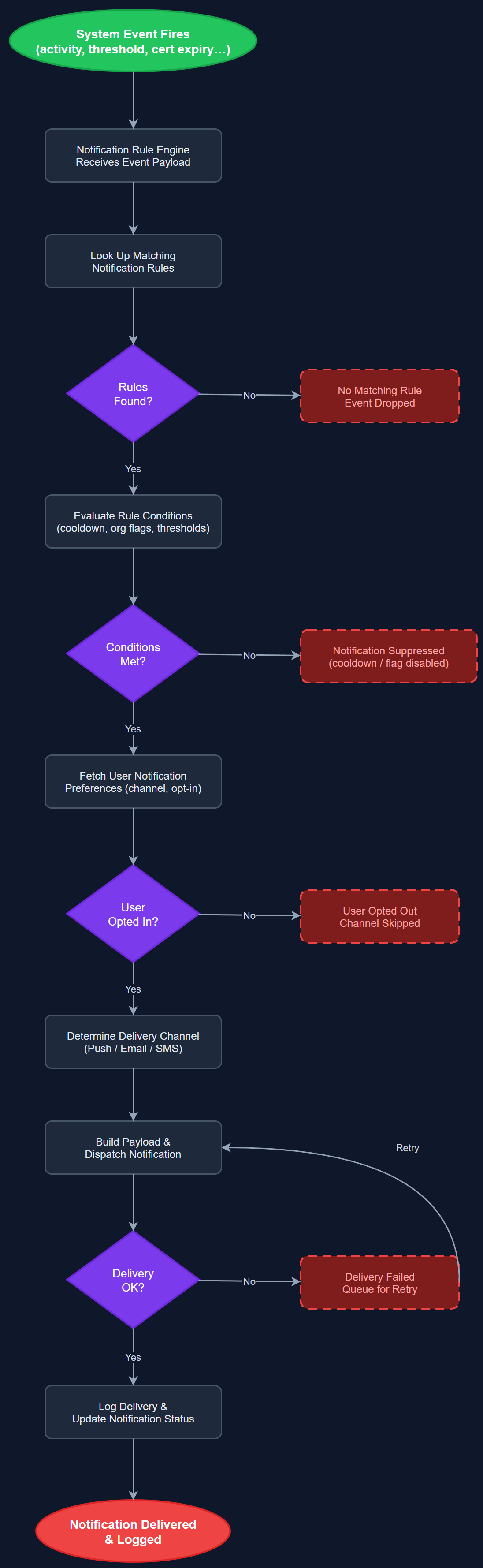
Notification Scenarios defines and manages the rule-based logic that determines when, to whom, and through which channel a notification is sent. The rule engine evaluates system events—such as an activity going 10 days without follow-up, an assignment threshold being reached, or a certification approaching expiry—and dispatches the appropriate notification payload. Rules are configured per event type and can be extended without modifying the notification delivery infrastructure. This component centralises all trigger logic to prevent fragmented notification calls scattered across the codebase.
User Flow
Analysis
Ad-hoc push calls embedded in business logic become unmaintainable as the platform grows; a centralised rule engine is the architectural prerequisite for the scenario-driven follow-up that Hørselsforbundet explicitly requested. Scenarios such as 'no contact made 10 days after assignment' (Blindeforbundet requirement) or 'certification expires in 30 days' (HLF requirement) are high-value automations that directly reduce coordinator workload. Without a rule engine, each scenario requires bespoke implementation; with one, new scenarios are configuration changes rather than code changes, reducing time-to-deploy for org-specific requirements.
The Notification Rule Engine runs as a scheduled job (cron or Vercel Cron) that queries the database for entities matching trigger conditions. Each rule is defined as a TypeScript object with fields: event_type, condition (a query or predicate), recipient_resolver (maps entity to user IDs), channel (push, email, sms, or all), template_id, and cooldown_hours (prevents duplicate sends). Rules are registered in a central array; the engine iterates rules, evaluates conditions, resolves recipients, checks notification_settings for opt-outs, and enqueues delivery. A notifications table records each sent notification with status for deduplication and audit. The engine must be idempotent: re-running for the same time window must not produce duplicate sends.
Components (114)
Shared Components
These components are reused across multiple features
User Interface (12)
Service Layer (34)
Data Layer (22)
Infrastructure (38)
User Stories
No user stories have been generated for this feature yet.