Offline Data Support
Feature Detail
Description
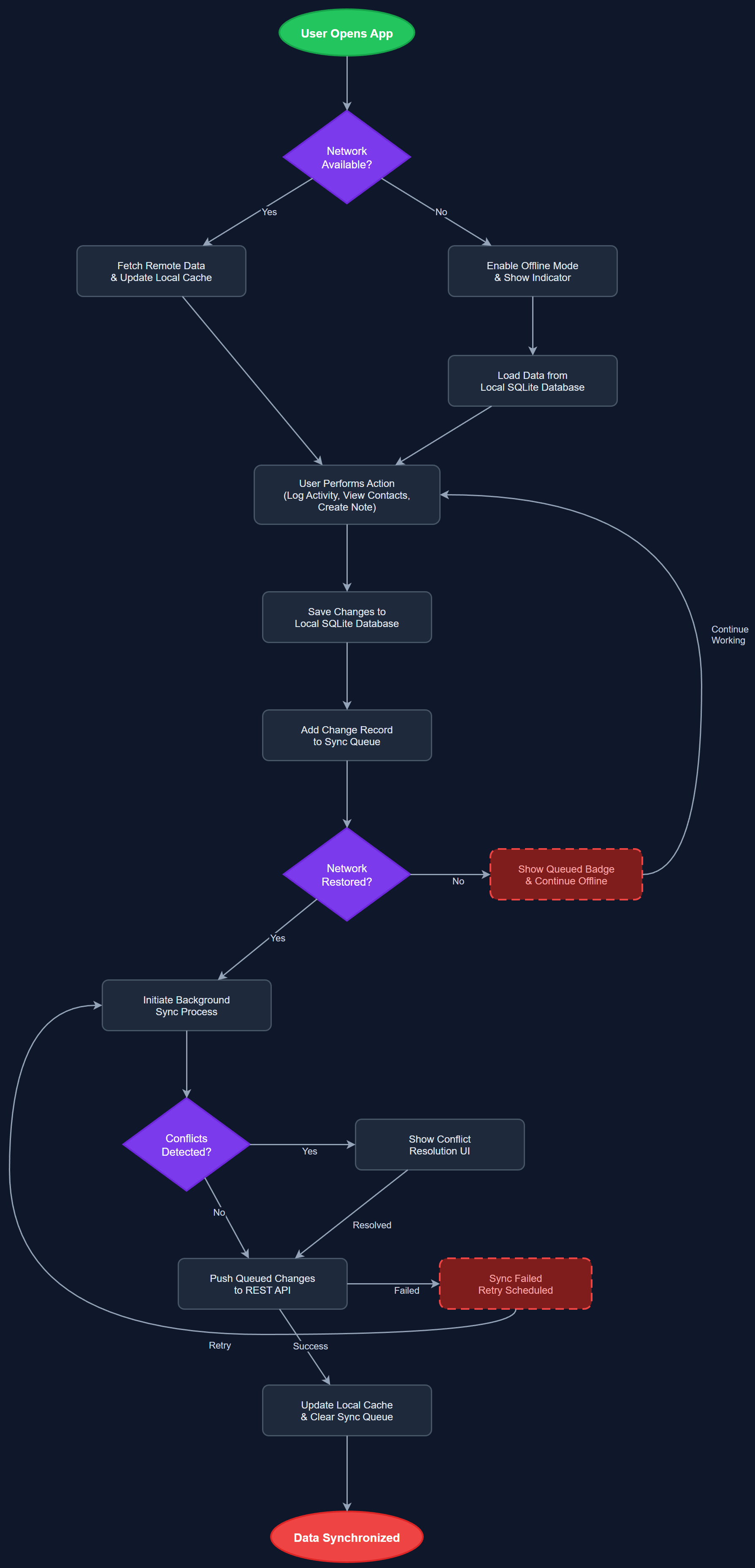
Offline Data Support enables peer mentors and coordinators to continue using the Meander mobile app without an active internet connection. The feature maintains a local SQLite database on the device, mirroring the data needed for core operations such as activity logging, contact lookup, and note creation. Changes made offline are queued and reconciled with the backend once connectivity is restored, ensuring no data is lost during periods without network access. This is particularly important for peer mentors operating in areas with poor mobile coverage or during home visits where connectivity may be unreliable.
User Flow
Analysis
Many peer mentors perform activities in settings where reliable internet connectivity cannot be guaranteed — rural areas, hospitals, care homes, or simply during travel. Without offline support, the app becomes unusable in these scenarios, forcing users back to paper-based or manual recording methods that defeat the purpose of digitalization. Enabling offline operation directly increases the reliability and adoption of the app across all participating organizations. It reduces the risk of data loss and ensures that the low-friction registration experience is available regardless of network conditions, which is critical to achieving the sub-two-click activity logging goal that all three workshop organizations identified as their top priority.
The implementation uses a local SQLite database managed via a Flutter plugin such as sqflite or drift (formerly Moor), storing a subset of the user's operational data locally. A sync queue table tracks all mutations (creates, updates, deletes) made while offline, with timestamps and retry counters. On connectivity restoration, the Background Sync service processes the queue in order, applying conflict resolution rules (last-write-wins for most fields, server-authoritative for approval status). The BLoC/Riverpod state layer abstracts data source selection — repository classes route reads to the local store first and fall through to the API when online. Initial data seeding occurs at login to populate contacts, activity types, and organization settings into the local store.
Components (113)
Shared Components
These components are reused across multiple features
User Interface (12)
Service Layer (34)
Data Layer (22)
Infrastructure (38)
User Stories
No user stories have been generated for this feature yet.