Organization Settings
Feature Detail
Description
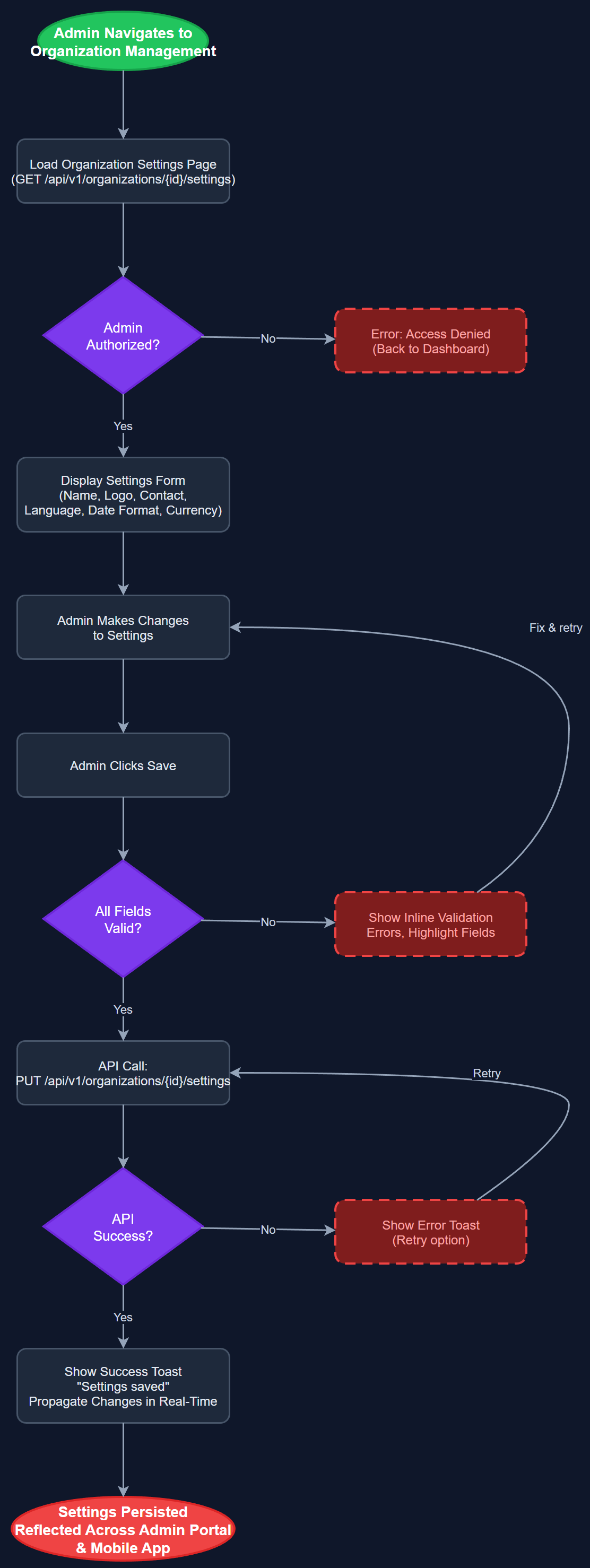
Organization Settings provides administrators with a centralized configuration panel for managing all organization-wide preferences, branding, and operational parameters. Administrators can update the organization's display name, logo, contact details, default language, and regional settings such as date formats and currency. The screen serves as the primary control point for tailoring the platform to each organization's identity and operational context, ensuring that coordinators and peer mentors see a consistent, branded experience that reflects their specific organization. All changes are persisted immediately and propagate across the admin portal and mobile app in real time.
User Flow
Analysis
Enabling each organization to configure its own settings is a fundamental requirement for a multi-tenant SaaS platform serving diverse Norwegian non-profit organizations such as NHF, Blindeforbundet, and HLF. Each organization has its own branding guidelines, contact information, and operational preferences, and a shared generic interface would create confusion and reduce adoption. Providing a dedicated settings panel reinforces organizational identity, increases trust from administrators, and reduces support tickets caused by misconfiguration. From a commercial perspective, this feature directly supports the platform's multi-tenancy model, making it easy to onboard new organizations without custom development work. It also enables Norse Digital Products to sell the platform as a configurable, white-label solution rather than a one-size-fits-all tool.
The settings page is implemented as a Next.js server-side rendered admin page consuming the REST API endpoint PATCH /api/v1/organizations/:id. The form uses React Hook Form with Zod validation schemas to ensure data integrity before submission. Logo uploads are handled via multipart form data to a dedicated file storage endpoint, with images stored in object storage and served via CDN. Changes are applied within a PostgreSQL transaction to ensure consistency. Row-level security in the database ensures that only users with the Org Admin or Global Admin role for the specific organization can modify settings. The frontend uses optimistic updates with rollback on failure to maintain a responsive UI experience.
Components (112)
Shared Components
These components are reused across multiple features
User Interface (12)
Service Layer (34)
Data Layer (22)
Infrastructure (38)
User Stories
No user stories have been generated for this feature yet.