Receipt Photo Upload
Feature Detail
Description
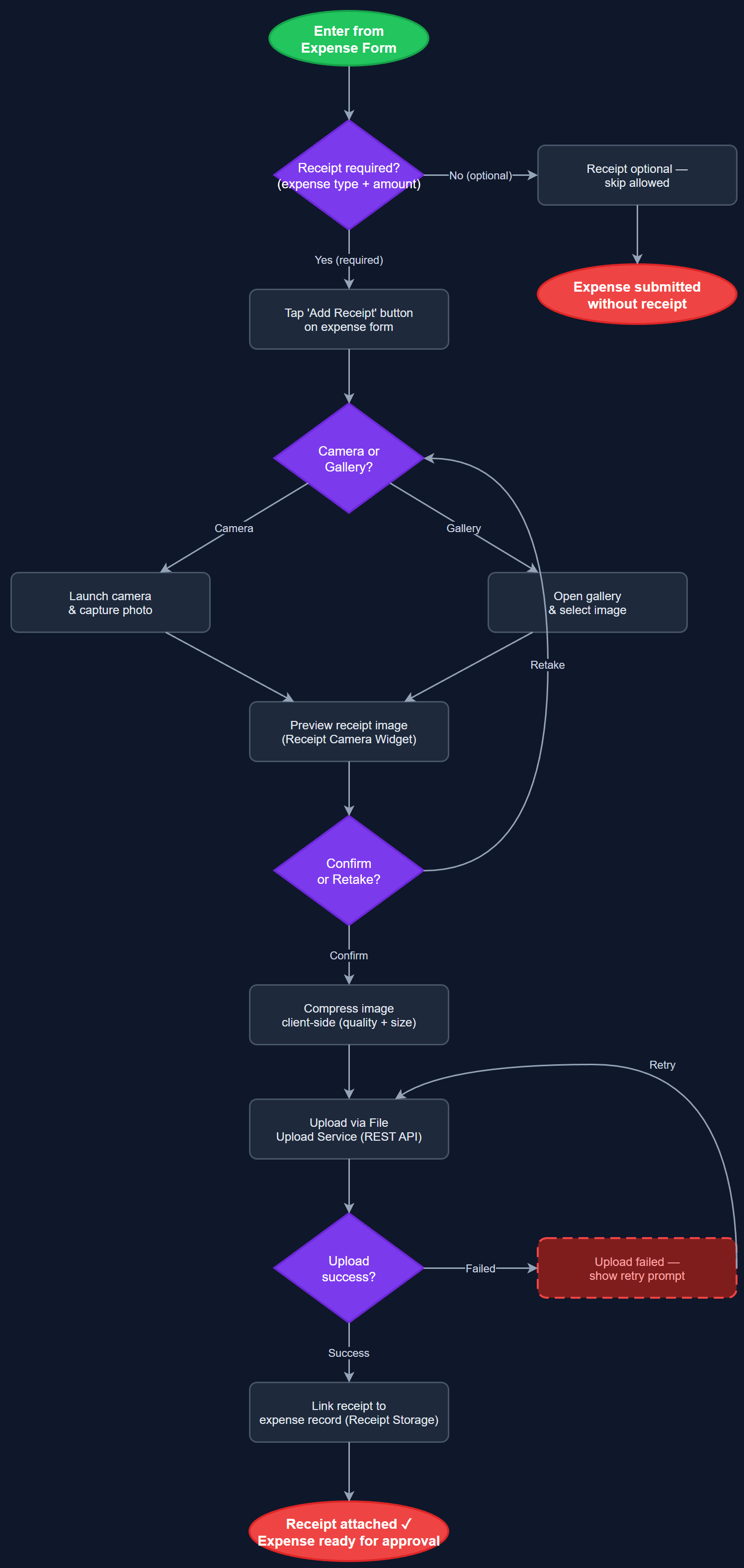
Provides in-app camera capture and file upload for attaching receipt photos to expense claims. Peer mentors can photograph receipts immediately after incurring a cost, or upload images from the device gallery. The feature enforces receipt requirements based on expense type and amount — for example, HLF requires a receipt for all expenses over 100 NOK. Uploaded images are compressed client-side before transmission and stored securely on the backend, linked to the parent expense record. Receipt status is surfaced in the coordinator's approval interface.
User Flow
Analysis
Receipt documentation is a mandatory audit requirement for many organisations receiving Bufdir funding. Without a streamlined in-app capture flow, peer mentors currently photograph receipts separately, attach them to emails, or simply omit them — leading to rejected reimbursement claims and manual follow-up work for coordinators. Integrating capture directly into the expense flow significantly reduces claim rejection rates and coordinator time spent chasing missing documentation. It also strengthens the audit trail required for government reporting, reducing the risk of funding clawbacks due to incomplete documentation.
Use the Flutter `image_picker` package to support both camera capture and gallery selection. Apply client-side image compression (target under 500 KB per image) using the `flutter_image_compress` package before upload to minimise bandwidth usage, particularly important for users with limited mobile data. Uploads should be chunked and resumable to handle poor network conditions. On the backend, store images in object storage (e.g. S3-compatible) with references saved to the `expense_receipts` table. Implement receipt requirement validation rules server-side, enforcing mandatory attachment based on expense type and amount thresholds configured per organisation. Ensure file type validation (JPEG, PNG, PDF) and virus scanning on ingest.
Components (118)
Shared Components
These components are reused across multiple features
User Interface (12)
Service Layer (34)
Data Layer (22)
Infrastructure (38)
User Stories
No user stories have been generated for this feature yet.