Recruitment Tracking
Feature Detail
Description
This feature provides coordinators and organization admins with a dashboard showing how many new members have joined through referral links, which peer mentors generated the most successful invites, and the current status of each referral in the onboarding funnel. The recruitment dashboard aggregates referral attribution data and surfaces conversion metrics, giving organizations visibility into their organic growth driven by existing members. Individual referral records track the full lifecycle from link generation through account activation.
User Flow
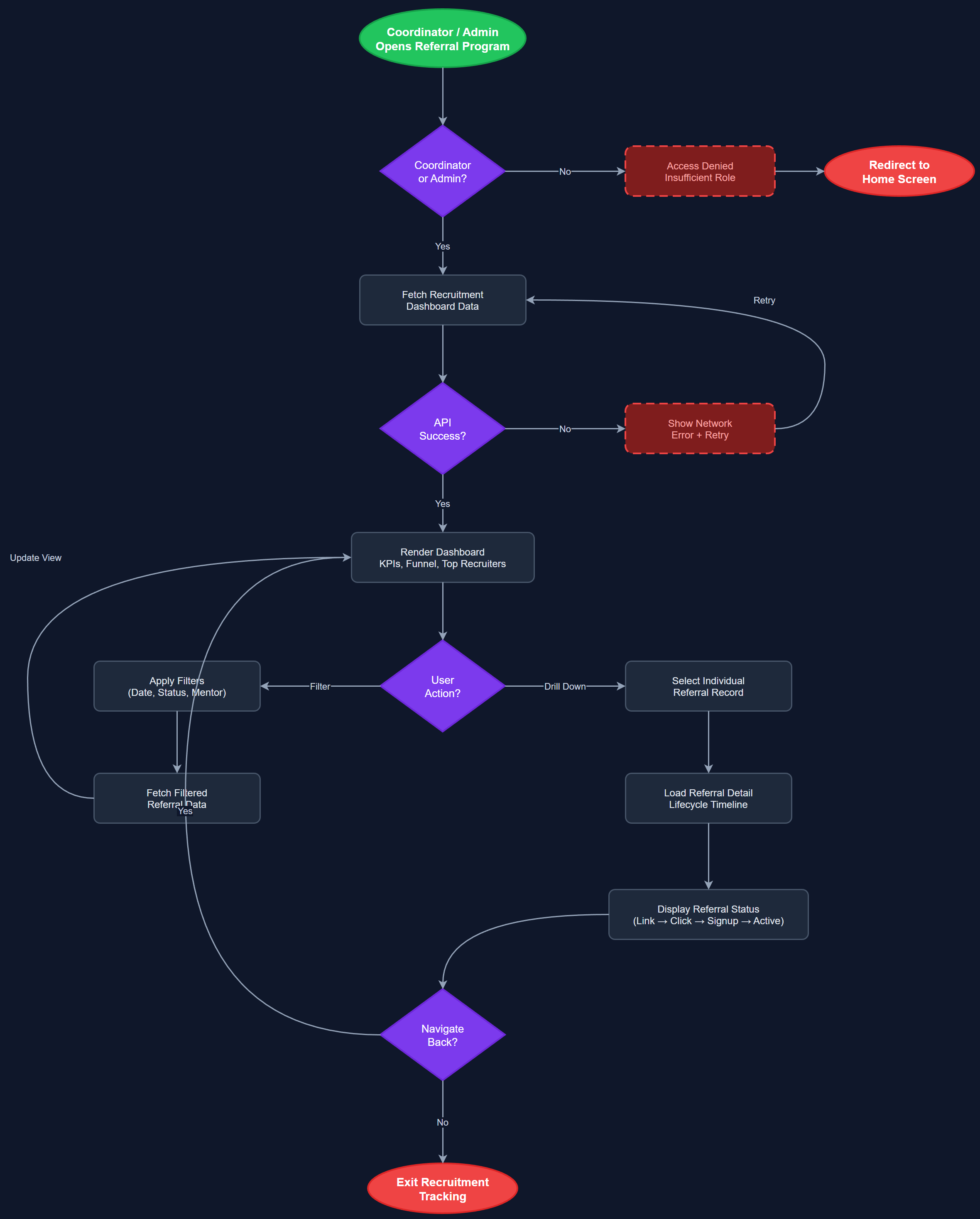
Analysis
Volunteer-driven growth is a key strategic lever for peer mentor organizations, but without attribution data it is invisible to leadership. Recruitment tracking makes this effort quantifiable, enabling organizations to identify their most effective recruiters, reward top performers, and replicate successful outreach patterns. This data feeds directly into the gamification and annual summary features, where recruitment contributions can be surfaced in a peer mentor's yearly impact overview. For Norse Digital Products, aggregated recruitment data across organizations also demonstrates platform-level growth velocity to prospective customers and funders.
Recruitment tracking is built on the referral_trackings table, which records each conversion event (link clicked, app installed, account created, first login) with timestamps and attribution to the source referral_link record. The Recruitment Dashboard widget in Flutter reads from a dedicated API endpoint that aggregates conversion counts grouped by referring user and time period. Server-side, the conversion funnel is updated via webhook or polling when the new user completes registration. The dashboard uses the same stats infrastructure as the personal activity statistics feature (Stats Aggregation Service, Stats Store) to avoid duplicating data-fetching logic. All data is scoped to the coordinator's organization to enforce tenant isolation.
Components (112)
Shared Components
These components are reused across multiple features
User Interface (12)
Service Layer (34)
Data Layer (22)
Infrastructure (38)
User Stories
No user stories have been generated for this feature yet.