Role-Based Access Control
Feature Detail
Description
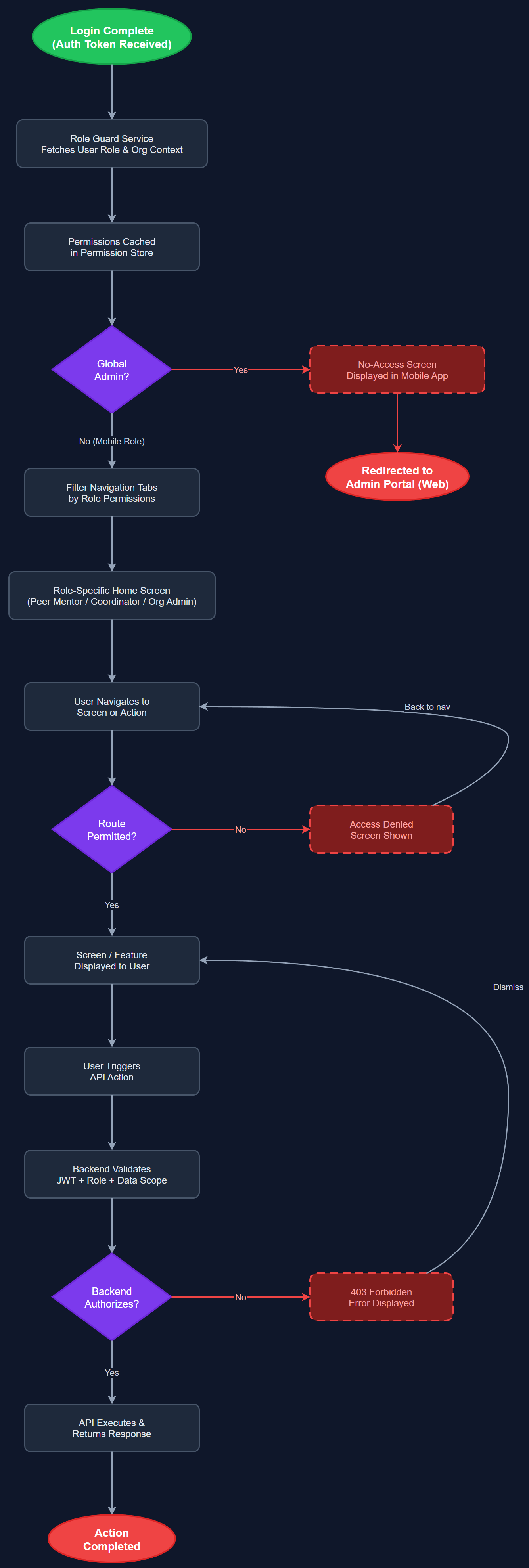
Enforces access boundaries based on the authenticated user's assigned role — Peer Mentor, Coordinator, Organisation Admin, or Global Admin. Each role has a defined set of permitted screens, actions, and data scopes. The mobile app enforces role-based navigation (e.g., Peer Mentors cannot access coordinator-only screens), while the backend validates permissions on every API request. Global Admins are redirected to the admin portal and shown a no-access screen in the mobile app. Organisation context is determined by the user's account, not by a login-time selection.
User Flow
Analysis
Role-based access control is a foundational security requirement for a multi-tenant platform handling sensitive personal data including encrypted assignments, contact health information, and financial expense records. Without RBAC, a Peer Mentor could access coordinator tools, modify other users' data, or view organisation-wide reports — a serious privacy and compliance violation. Proper role enforcement also simplifies the UX by hiding irrelevant features per role, reducing cognitive load for low-digital-skill users. Multi-tenant isolation ensures that an org admin from one organisation cannot access another organisation's data, which is critical for GDPR compliance and partner trust.
Roles and permissions are stored in the PostgreSQL database (user_roles, user_role_assignments tables). The JWT access token includes the user's role and organisation ID as claims. The Next.js API validates these claims on every protected endpoint using middleware. In the Flutter app, the current role is loaded into a RoleGuard BLoC after login and stored in a PermissionStore. UI components check the BLoC state to conditionally render or hide features. Route guards in the Flutter navigation stack prevent direct URL navigation to restricted screens. The system supports users with multiple roles (e.g., a Coordinator who is also a Peer Mentor) using the profile-switching feature, with the active role determining current permissions.
Components (111)
Shared Components
These components are reused across multiple features
User Interface (12)
Service Layer (34)
Data Layer (22)
Infrastructure (38)
User Stories
No user stories have been generated for this feature yet.