Role-Specific Home Dashboard
Feature Detail
Description
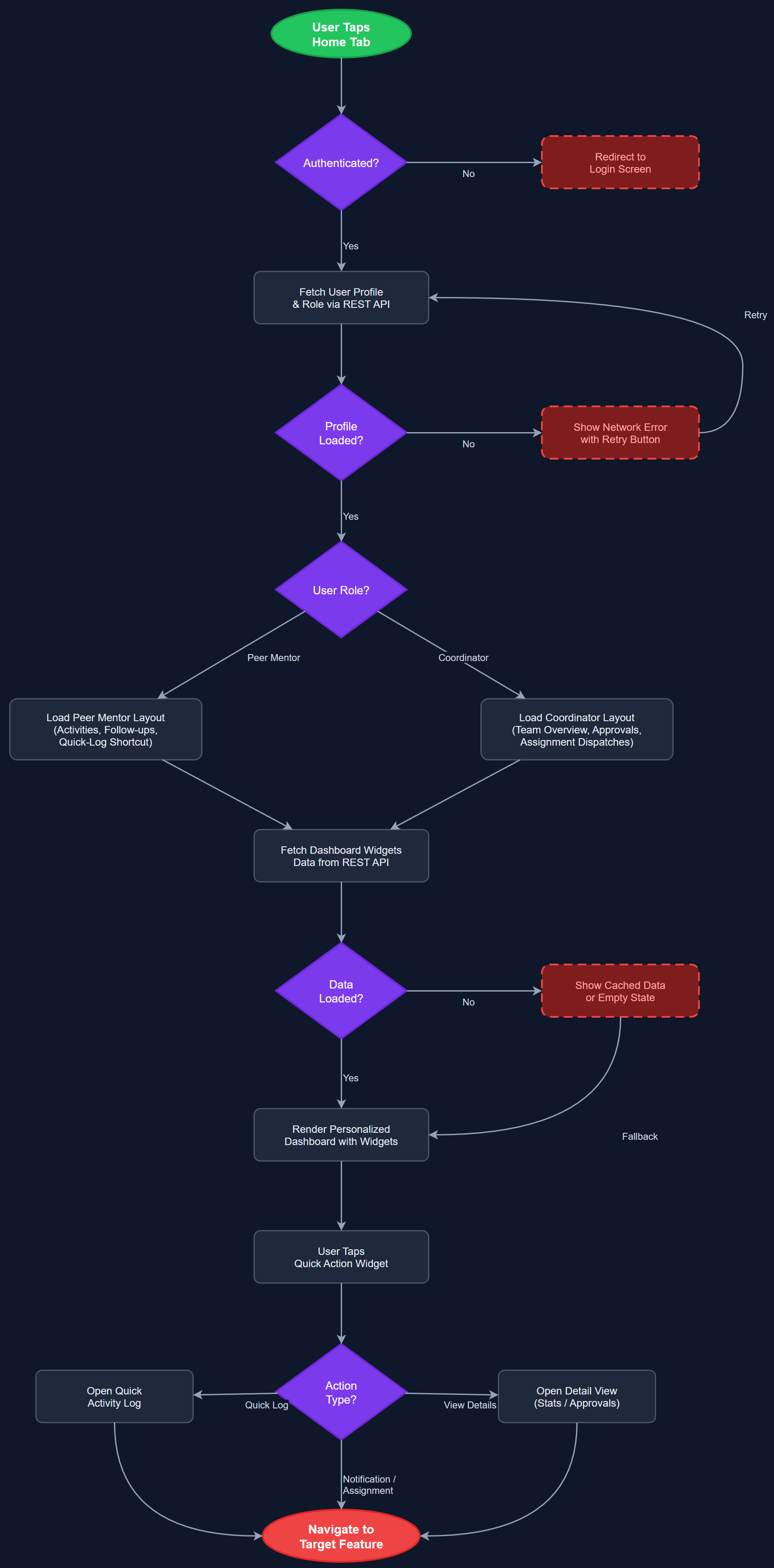
The Role-Specific Home Dashboard provides a personalized entry point for every user of the Meander Mobile App, dynamically adapting its content and quick-access widgets based on the authenticated user's role (Peer Mentor or Coordinator). Peer Mentors see their recent activities, upcoming follow-ups, and a quick-log shortcut, while Coordinators see team overviews, pending approvals, and assignment dispatches. The dashboard acts as the operational nerve center, surfacing the most contextually relevant information and actions without requiring navigation deeper into the app.
User Flow
Analysis
A role-tailored home screen is foundational to achieving the project's core design principle of minimizing cognitive load. Peer Mentors — many of whom have beginner-level digital skills or cognitive accessibility needs — must arrive at a screen that immediately shows what they need to do next, without hunting through menus. Coordinators require a different operational view to manage their teams efficiently. By surfacing role-appropriate content at launch, the app dramatically reduces time-to-first-action, increases daily engagement, and reduces support requests stemming from user confusion. This is the first screen users see every session, making its quality and relevance a direct driver of adoption and retention across all four partner organizations.
Implemented in Flutter using BLoC for state management, with the home screen widget tree branching on the authenticated role retrieved from the local token/permission store. Role detection is performed at app startup via the Auth BLoC, and the home screen subscribes to the appropriate BLoC streams (ActivityBloc, AssignmentBloc, TeamStatsBloc) depending on role. All dynamic content is fetched from the REST API on mount with a stale-while-revalidate strategy; cached data from local SQLite is shown immediately while fresh data loads. WCAG 2.2 AA compliance requires all stat cards and action buttons to meet 24×24 minimum touch target size and 4.5:1 contrast ratios. The dashboard layout uses a single-column vertical scroll pattern to support accessibility and avoid swipe-based navigation.
Components (112)
Shared Components
These components are reused across multiple features
User Interface (12)
Service Layer (34)
Data Layer (22)
Infrastructure (38)
User Stories
No user stories have been generated for this feature yet.