Sensitive Field Readout Warning
Feature Detail
Description
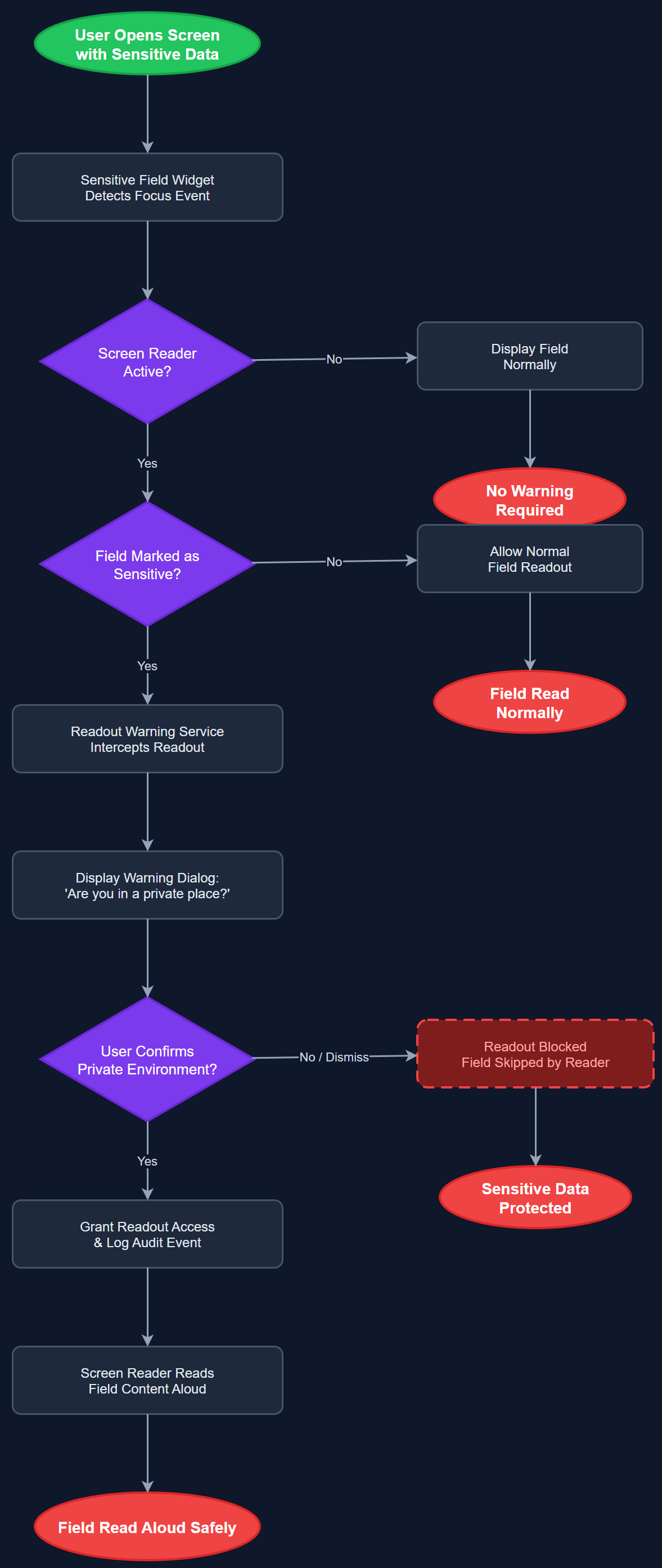
This feature displays a prominent warning to the user when a screen reader is active and is about to read out a field that contains sensitive personal information — such as a contact's full name, address, phone number, or health-related data. The warning interrupts the automatic readout and prompts the user to confirm they are in a private environment before the content is spoken aloud. This prevents accidental exposure of confidential data to bystanders in public settings. The feature is configurable at the organisation level so that administrators can designate which fields are sensitive based on their specific data policies.
User Flow
Analysis
Partner organisations — particularly NHF and Blindeforbundet — handle highly personal data about vulnerable individuals, including health conditions, home addresses, and assignment details. Blind users who rely on screen readers routinely use the app in public spaces such as public transport or waiting rooms. Without a readout warning mechanism, sensitive data could be inadvertently broadcast to strangers, violating both user privacy and GDPR data minimisation principles. This feature was explicitly raised by NHF as a requirement and directly addresses the organisation's duty of care to both peer mentors and the contacts they support. It also reduces the liability exposure for Norse Digital Products and partner organisations in the event of a data incident.
Implementation involves annotating sensitive data fields in the data model layer with a sensitivity flag that the UI layer reads at render time. A SensitiveFieldWidget wrapper intercepts the Flutter accessibility system's focus and speak events using a custom SemanticsAction override. When a screen reader focuses a sensitive field, the widget triggers an interstitial dialog — rendered above the current screen with its own accessible label — that pauses readout and asks the user to confirm they are in a private environment. If confirmed, readout proceeds normally; if dismissed, the field announces only a generic placeholder (e.g., 'Sensitive data — tap to reveal'). The sensitivity configuration is driven by the organisation-level settings stored in the Organisation Settings screen, allowing admins to mark fields as sensitive without a code deploy. The feature must itself be fully accessible and operable by screen reader users.
Components (112)
Shared Components
These components are reused across multiple features
User Interface (12)
Service Layer (34)
Data Layer (22)
Infrastructure (38)
User Stories
No user stories have been generated for this feature yet.