Session Management
Feature Detail
Description
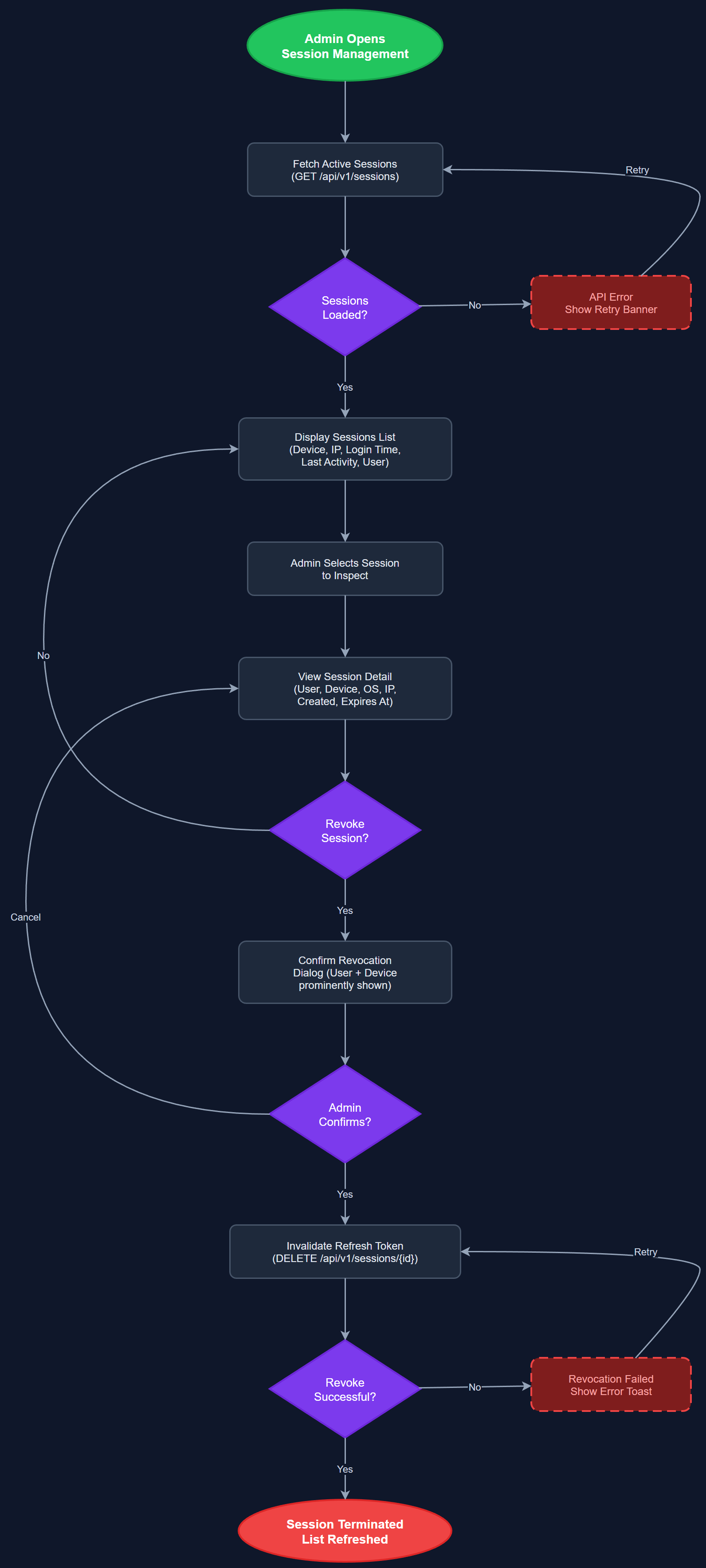
Session Management gives administrators visibility into and control over active user sessions across the platform. Administrators can view all currently active sessions for users within their organization, see device and login metadata (device type, login timestamp, last activity), and forcibly terminate sessions — for example, when an employee leaves or a device is reported lost. Users can also view and revoke their own sessions from the mobile app settings. The feature integrates with the JWT refresh token infrastructure to ensure revocation takes effect immediately.
User Flow
Analysis
Session management addresses a critical operational security gap: without it, administrators have no way to respond to a compromised account or offboard a user completely. In a platform used by coordinators who handle encrypted assignments and sensitive contact data, the ability to instantly revoke access is essential to limiting blast radius when credentials are compromised. For organizations with high volunteer turnover — a defining characteristic of all three workshop organizations — clean offboarding via session termination is a routine operational need, not an edge case. This feature also supports GDPR right-to-erasure workflows by ensuring no active sessions remain after account deletion is initiated.
Sessions are tracked in the sessions and refresh_tokens tables, with each refresh token linked to a session record containing device metadata and last-activity timestamp. The SessionService exposes REST endpoints for listing active sessions (scoped by org for Org Admin, cross-org for Global Admin, own sessions for end users), and for revoking individual sessions or all sessions for a user. Revocation works by deleting the refresh_token record and adding the access token's JTI to a short-lived Redis blocklist (or a database blocklist table if Redis is not in scope for MVP) — ensuring the current access token cannot be reused after its TTL. The Session Management Page in the admin portal is a server-rendered Next.js page. The mobile app exposes a 'Manage Sessions' screen in Settings, calling the same API endpoints with user-scoped authorization.
Components (113)
Shared Components
These components are reused across multiple features
User Interface (12)
Service Layer (34)
Data Layer (22)
Infrastructure (38)
User Stories
No user stories have been generated for this feature yet.