Speech-to-Text Input
Feature Detail
Description
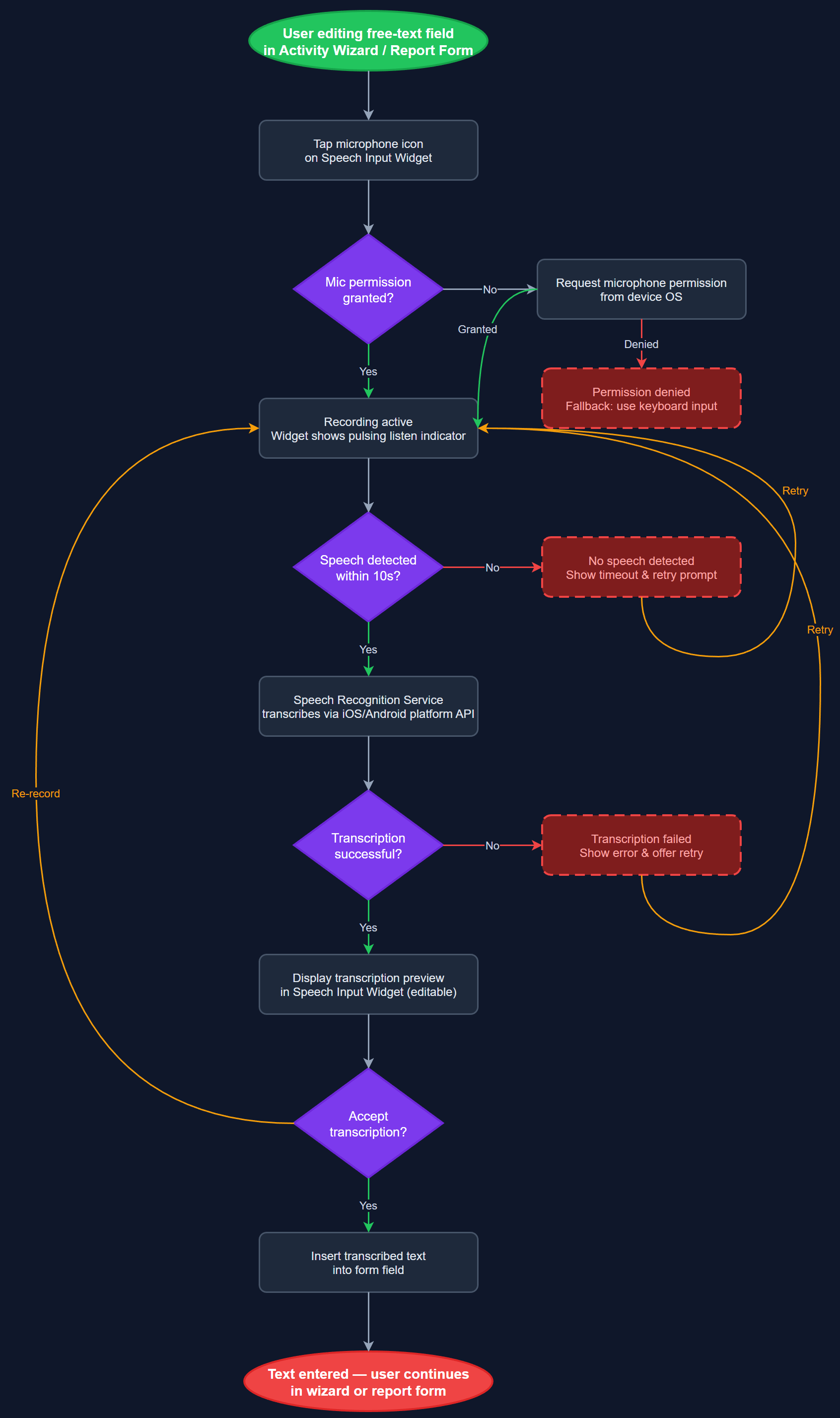
This feature allows peer mentors to dictate activity notes and report content using their device microphone instead of typing. Speech-to-text is available within the activity notes field and the structured report fields of the registration wizard. The feature is strictly a post-activity transcription tool — it is explicitly not a recording of the activity itself, which would violate participant privacy. The transcribed text is editable before submission, and the user retains full control over what is saved.
User Flow
Analysis
Both Blindeforbundet and HLF raised speech-to-text as a priority accessibility and usability feature. For Blindeforbundet peer mentors, many of whom have visual impairments, typing on a mobile keyboard is slow and error-prone; voice input dramatically lowers the barrier to completing structured reports after a home visit. For HLF, where a single peer mentor may complete dozens of registrations per month, voice input reduces the time cost per registration and encourages more detailed note-taking. Critically, Blindeforbundet explicitly stated that recording during the actual visit is not acceptable — the feature must be framed and implemented as a post-hoc transcription tool to preserve participant trust and comply with privacy expectations.
Implemented using the speech_to_text Flutter package, which delegates to the platform's native speech recognition engine (iOS: SFSpeechRecognizer, Android: SpeechRecognizer). An STTService manages the recognition session lifecycle (start, stop, error handling, timeout) and exposes a stream of partial and final transcription results to the UI. An STTProviderAdapter abstracts platform differences. The microphone permission (NSMicrophoneUsageDescription on iOS, RECORD_AUDIO on Android) is requested on first use with a clear explanation that the feature is for note dictation only. The UI shows a prominent recording indicator and a clear stop button. Transcribed text is inserted into the active text field and is fully editable before saving. Language support defaults to Norwegian (nb-NO) with fallback to the device locale. No audio is transmitted to external servers — all processing uses the on-device engine.
Components (113)
Shared Components
These components are reused across multiple features
User Interface (12)
Service Layer (34)
Data Layer (22)
Infrastructure (38)
User Stories
No user stories have been generated for this feature yet.